Billing
Manage your subscription, payment information, invoices, and usage limits.
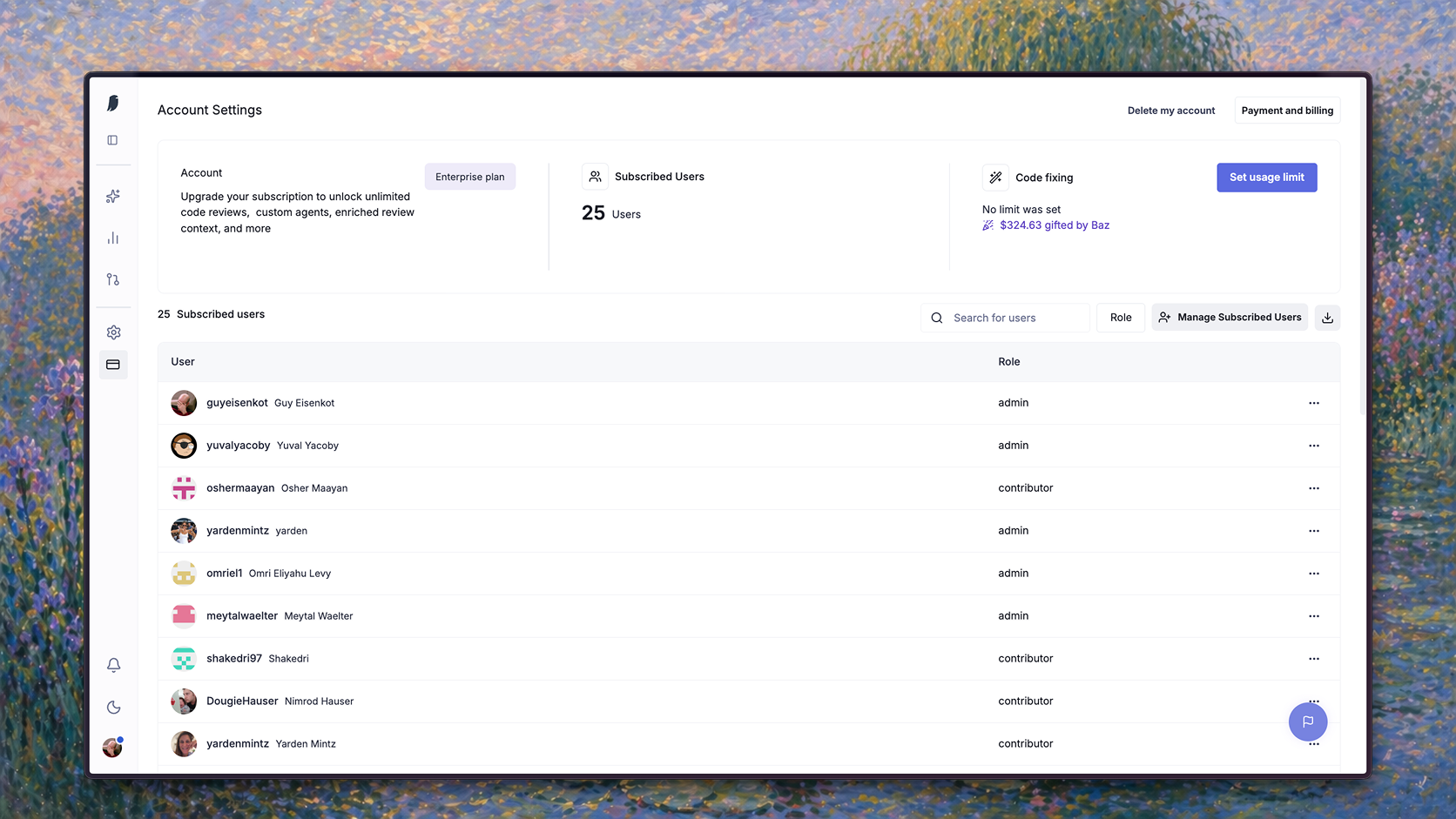
Account Settings in Baz lets you manage your subscription, subscribed users, payment information, invoices, and usage limits.
Billing is handled through Stripe. Baz does not store or process credit card information directly.
View or update billing
To view or update billing information:
- Go to Settings → Account Settings
- Click Payment & Billing
- You will be redirected to the Stripe billing portal
Subscription
In the billing portal, you can view:
| Field | Description |
|---|---|
| Current plan | Your active Baz subscription, such as Pro or Enterprise |
| Seats | The number of subscribed users on the account |
| Cost | Subscription total and billing frequency |
| Next billing date | The next scheduled billing date |
| Update subscription | Manage or update your plan |
Subscribed users
Repository owners
Enterprise accounts can assign repository owners.
Repository owners are users who can manage custom reviewers for specific repositories without giving them full organization admin access.
Repo owners can create and edit custom reviewers only for the repositories they own. They cannot create or edit custom reviewers for repositories outside their assigned ownership scope.
Organization admins can assign and update repository owners from Account Settings.
To manage repository owners:
- Go to Settings → Account Settings
- Select Repository Owners
- Select a repository
- Add or remove repository owners
Repository owner permissions
| Permission | Admin | Repository owner |
|---|---|---|
| Assign repository owners | Yes | No |
| Create custom reviewers for any repository | Yes | No |
| Edit custom reviewers for any repository | Yes | No |
| Create custom reviewers for owned repositories | Yes | Yes |
| Edit custom reviewers for owned repositories | Yes | Yes |
| View repositories available to them | Yes | Yes |
Repository owners only see and manage repositories they are allowed to access.
If a user is removed as a repository owner, they lose the ability to create or edit custom reviewers for that repository. Existing custom reviewers are not deleted.
Engineering Work Credits
Engineering Work Credits are used for high-model engineering work performed by Baz agents.
Seat-based pricing covers access to Baz and standard AI code review. Engineering Work Credits cover agent work that investigates, validates, fixes, or generates engineering output.
Engineering Work Credits are effective June 1, 2026.
What uses Engineering Work Credits
Engineering Work Credits are used for:
| Agent work | Description |
|---|---|
| Fixer session | Baz analyzes a finding and generates a code fix |
| Advanced Security | Baz performs deeper security analysis across the codebase |
| Spec Reviewer | Baz validates implementation against requirements, specs, tickets, or product intent |
| AI SRE | Baz investigates issues using runtime context, logs, traces, and code paths |
Standard AI code review does not use Engineering Work Credits.
How credits work
Usage is billed in credits.
1 credit = $0.01
Credits are consumed when a credit-eligible agent session runs. The number of credits used depends on the agent, repository size, codebase complexity, and the amount of context required.
Typical session ranges:
| Agent work | Typical cost per session |
|---|---|
| Fixer session | $1.00 to $4.30 |
| Advanced Security | $1.75 to $2.20 |
| Spec Reviewer | $1.00 to $2.50 |
| AI SRE | $1.50 to $3.00 |
Usage limits
You can control Engineering Work Credit usage with limits.
Available limits:
| Limit | Description |
|---|---|
| Organization usage limit | A single monthly credit limit for the entire organization |
| Per-user usage limit | A monthly credit limit per subscribed user |
When a usage limit is reached, Baz stops running additional credit-eligible agent work until the limit is updated or more credits are available.
Standard AI code review continues according to your active subscription.
Usage and spend visibility
Account Settings includes a usage summary that shows current spend against your organization and per-user limits for the billing period, updated as credit-eligible sessions run.
The summary breaks spend down by agent work, including Fixer sessions, so admins can see whether spend is concentrated in a specific workflow before deciding to adjust a limit.
To review or update a limit:
- Go to Settings → Account Settings
- Select Usage
- Review current spend by agent work, then update the organization or per-user limit
Payment method
You can manage payment methods directly through Stripe.
Supported actions:
| Action | Description |
|---|---|
| Add payment method | Add a credit or debit card |
| Update payment method | Replace the current card |
| Remove payment method | Remove a saved payment method where supported |
| Update billing details | Edit billing contact and company information |
Payment details are processed securely by Stripe. Baz does not store credit card information.
Purchase through AWS Marketplace
Baz is available on the AWS Marketplace, so organizations that procure software through AWS can subscribe to Baz using their existing AWS billing and committed spend.
Purchasing through AWS Marketplace routes payment through your AWS account instead of Stripe. Contact sales to set up billing this way.
Billing information
Billing information includes:
| Field | Description |
|---|---|
| Account name | Organization name |
| Billing contact | Email used for billing communication |
| Billing details | Company and payment details |
| Tax information | Tax details where applicable |
You can update billing information from the Stripe billing portal.
Invoice history
The billing portal includes invoice history.
Each invoice includes:
| Field | Description |
|---|---|
| Date | Invoice issue date |
| Amount | Amount billed |
| Status | Payment status |
| Type | Subscription, Engineering Work Credits, or other billing item |
Invoices can be downloaded from the billing portal.
Cancel or delete account
To delete your account:
- Go to Settings → Account
- Click Delete my account
- Confirm the action
Deleting an account is irreversible. Team members lose access immediately, and Baz stops reviewing Change Requests.
FAQ
What is the difference between seats and Engineering Work Credits?
Seats cover access to Baz and standard AI code review. Engineering Work Credits cover the deeper agent work: Fixer sessions, Advanced Security, Spec Reviewer, and AI SRE. Standard AI code review does not consume credits.
What happens when a usage limit is reached?
Baz stops running further credit-eligible agent work until the limit is raised or more credits are available. Standard AI code review continues under your active subscription.
How do I see where credits are going?
Settings, Account Settings, Usage shows current spend against the organization and per-user limits for the billing period, broken down by agent work, so you can see whether spend is concentrated in one workflow before changing a limit.
Can we buy Baz through AWS?
Yes. Baz is available on the AWS Marketplace, which lets you procure it under an existing AWS agreement. See Enterprise Hosting for the deployment side.