Configurations
Every setting under Baz Settings, Configurations: what it does and what it defaults to.
Configurations is where Baz’s automated behavior is managed across your team’s review workflow. Find it under Baz → Settings → Configurations. Settings are grouped into two areas: Auto Audit controls how Baz reviews and analyzes your code, and Auto Resolve & Approve controls the actions Baz takes on your behalf.
Changing a configuration requires an organization admin. Non-admins see the current state without being able to edit it. Labels follow your provider, so a GitLab organization reads “merge request” wherever the tables below say “pull request”.
Auto Audit
Trigger mode
The three automatic triggers take a repository selection rather than a single on or off. Selected repositories are reviewed automatically; every other repository falls back to on-demand, triggered by a comment on the change.
| Setting | Description | Default |
|---|---|---|
| Automatic Review | Baz reviews pull requests automatically in the selected repositories. Elsewhere, comment Baz review to trigger one |
On for all repositories |
| Automatic Summary | Baz generates a description automatically in the selected repositories. Elsewhere, comment Baz summarize |
On for all repositories |
| Automatic Spec Review | Spec Reviewer runs automatically in the selected repositories. Elsewhere, comment Baz spec review |
On for all repositories |
| Recommended agents generation cycle | How often Baz scans historical discussions to propose new recommended agents. Options run from 1 week to 6 months, and the row shows when it last ran and when it is next scheduled | Off, 3 months when enabled |
Reducing the repository coverage of Automatic Review is a real reduction in automatic review, so Baz confirms it the first time you narrow the selection. Trigger mode is available on paid plans.
Review Visibility & Controls
| Setting | Description | Default |
|---|---|---|
| Disable review status in Checks | Baz reviews will not appear as a provider check on changes, per repository | Off |
| Enable PR graph generation | Baz includes graphs as part of its change summary, per repository | Off |
| Limit comments per PR | Caps how many comments Baz posts on one change, so reviewers are not overwhelmed | Off |
| Review draft PRs | Baz reviews draft changes, per repository | Off |
| Ignore branch patterns | Skip branches matching a pattern. Each pattern is scoped to a repository, or all of them, and to a direction: source, target, or both | Off |
| Comments fixing options | Which fix paths appear in Baz comments: Baz fixer, Fix in cursor, Copy AI prompt, and Suggestions | Set per organization |
| PR overview comment | Which sections the overview comment includes: the generated description and the topics table. Rolling out gradually, so it may not be present yet | Both shown |
Content Filtering
Content filtering controls what information Baz processes from tickets. Filtered Names takes a comma-separated list of names Baz should ignore, for example John,Smith. It is off until you enable it and add names.
Auto Resolve & Approve
Auto resolve
Reply to resolved discussions controls how Baz marks addressed comments. When enabled, choose whether Baz replies to all relevant threads or only to Baz threads, and whether the reply is a comment naming the commit that addressed the discussion or a 👍 reaction on the original message.
Auto resolve rules decide when Baz closes a thread. Each rule is scoped to repositories and discussion authors. One condition is always enforced and needs no configuration: Baz resolves a thread only if a later commit already addressed the comment, or if the feedback was explicitly rejected.
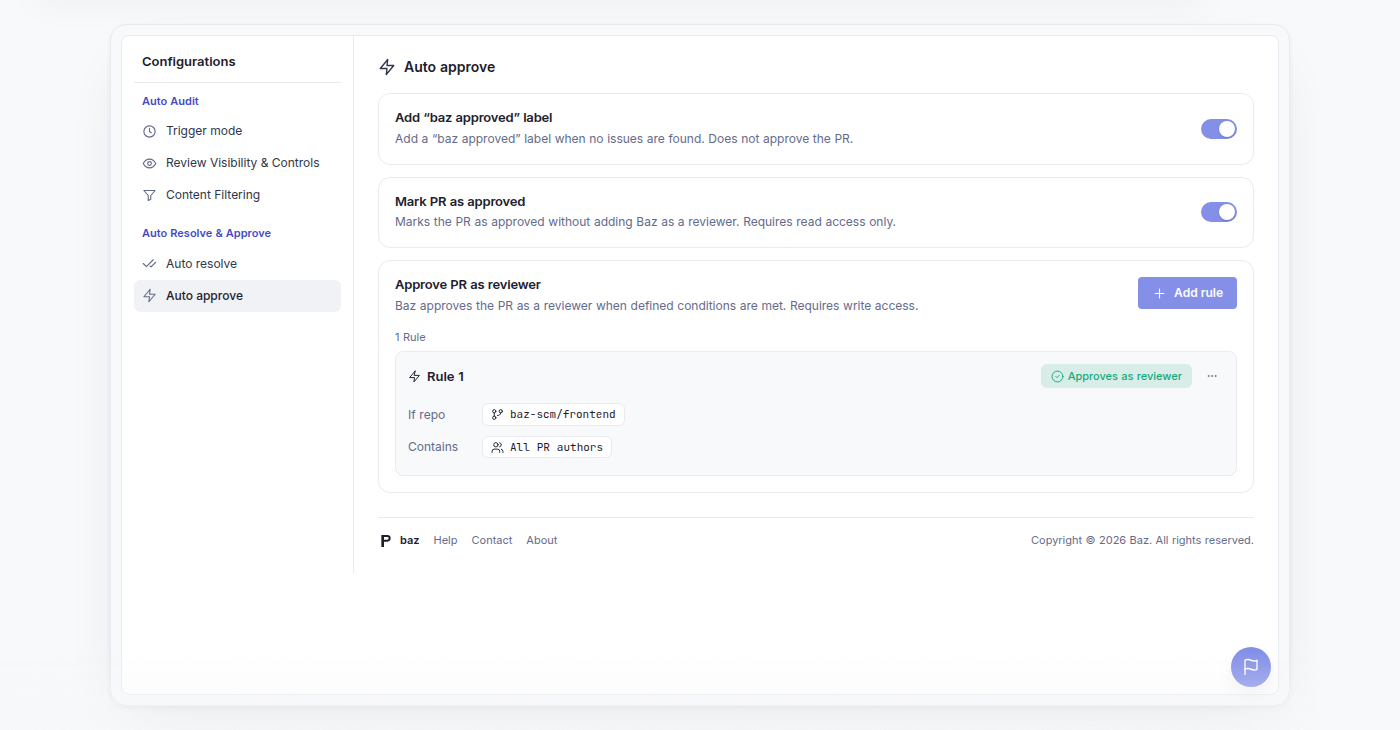
Auto approve
| Setting | Description | Default |
|---|---|---|
| Add “baz approved” label | Adds a “baz approved” label when no issues are found. Does not submit a review and does not approve the change | On |
| Mark PR as approved | Marks the change as approved without adding Baz as a reviewer. Requires read access only | Set per organization |
| Approve PR as reviewer | Rule-based: Baz submits an approving review, as a reviewer, when a rule’s conditions are met. Requires write access | No rules |
Each approval rule scopes to repositories and authors, then adds conditions: excluded paths, a maximum number of lines changed, a maximum number of files changed, and a findings severity bar per agent. A rule ends in an action, either approve or do not approve, so rules can also hold approval back on changes that match. If any condition of a rule is unmet, no approval is added.
See Merge Automation for how these settings sit alongside the Merger agent, which is configured from its own agent drawer rather than from Configurations.
FAQ
How do I invoke a code review on demand?
Comment on the change in plain language and ask Baz to review or summarize, for example Baz please review this PR or baz summary plz.
How do I invoke a summary on demand?
The same way as a review: add a comment asking Baz for a summary.
Why can I see a setting but not change it?
Editing Configurations requires an organization admin. Everyone else sees the current state read-only.
What happens to repositories I leave out of Automatic Review?
They are not reviewed automatically, but they are not cut off. Anyone can trigger a review there with a Baz review comment. Baz warns you the first time you narrow the selection, because coverage is being reduced.
Where do merge rules live?
Not in Configurations. Merger’s rules are configured in the Merger agent drawer under Agents. Configurations covers approvals and thread resolution.