---
title: "Software Factory"
description: "Every Baz agent in the Build, Deploy, and Maintain stages, what each one needs, and how coverage is measured."
canonical: "https://baz.ai/docs/agents"
---
# Software Factory
Every Baz agent in the Build, Deploy, and Maintain stages, what each one needs, and how coverage is measured.
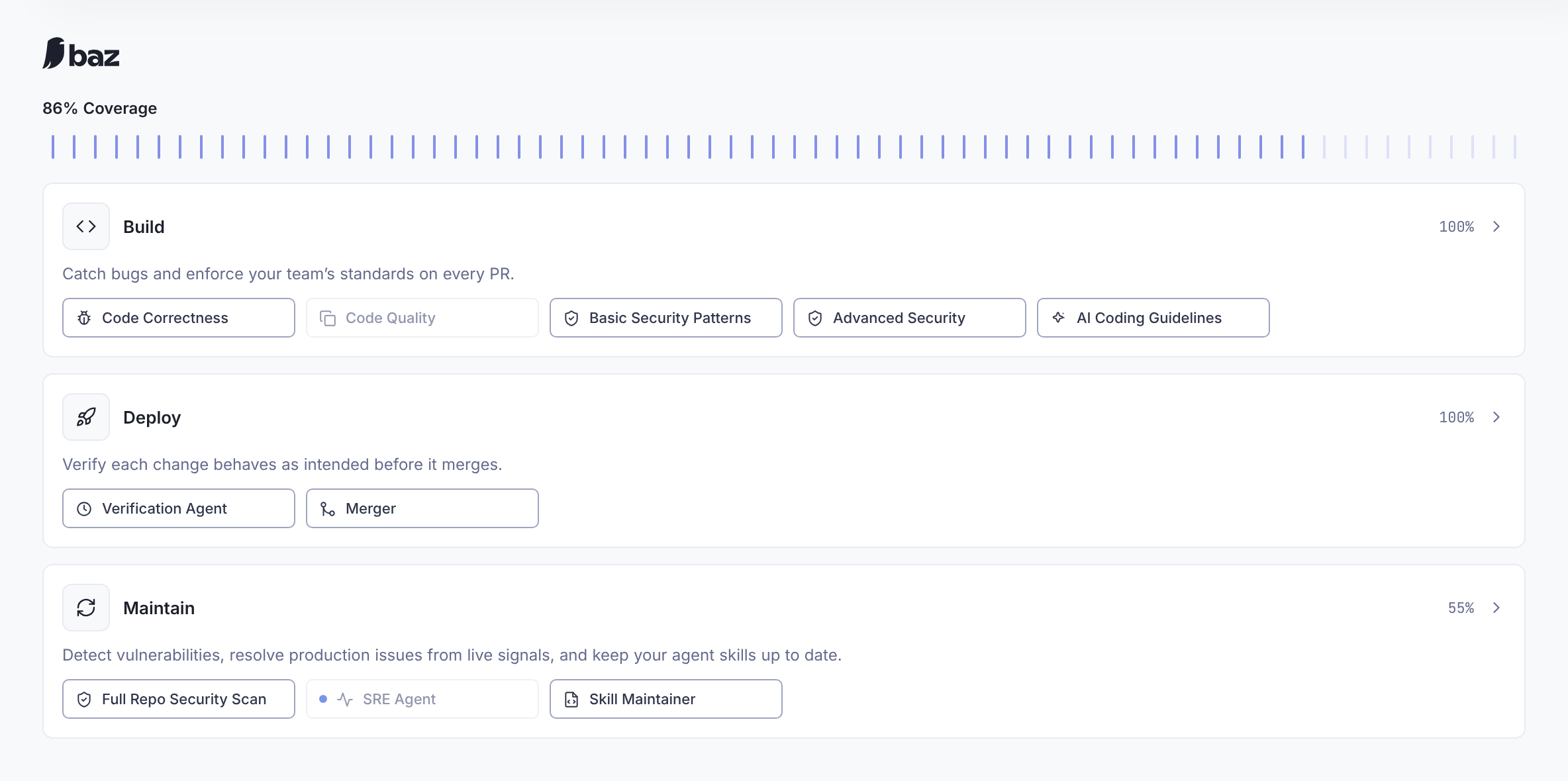
The Software Factory is the home of every Baz agent. It groups agents into three stages of the software lifecycle: Build reviews each pull request, Deploy decides whether a change is ready to ship, and Maintain works on code that is already in production. Open **Software Factory** in the sidebar to see your organization's factory, titled with your organization's name.
The Software Factory: overall coverage, then one card per stage with its agents
## Stages and agents
**Build** agents check every pull request: [Code Correctness](/docs/agents/build/code-correctness), [Code Quality](/docs/agents/build/code-quality), [AI Coding Guidelines](/docs/agents/build/ai-coding-guidelines), [Basic Security Patterns](/docs/agents/build/basic-security-patterns), [Advanced Security](/docs/agents/build/advanced-security), and [Fixer](/docs/agents/build/fixer). **Deploy** agents check that a change works as intended before it merges: [Verification Agent](/docs/agents/deploy/verification-agent) and [Merger](/docs/agents/deploy/merger). **Maintain** agents look after code already in production: [Full Repo Security Scan](/docs/agents/maintain/full-repo-security-scan), [SRE Agent](/docs/agents/maintain/sre-agent), and [Skill Maintainer](/docs/agents/maintain/skill-maintainer).
Maintain agents open fix pull requests, and those pull requests go through the Build agents like any other change.
## Coverage
The coverage bar at the top of the page shows **NN% Coverage**: how much of the factory your enabled and fully set up agents cover. Each stage card shows its own percentage, and each stage page has its own bar.
An agent counts toward coverage only when it is on and its prerequisites are in place. The code review agents count for the largest share, and each other agent adds a smaller, equal share. Hover over the bar to see the single step that raises coverage the most, with **Click here** to go to it. Examples of what the bar suggests:
- "No reviewer is checking your PRs. Turn one on to catch issues before merge."
- "Check every change against its spec before it merges."
- "Let Baz decide when a PR is safe to merge."
- "Merger is on but has no rules to enforce. Set your guardrails."
- "Find vulnerabilities in code that's already shipped."
- "Let Baz investigate production issues from live signals."
Stage pages also list coverage gaps with a fix for each, for example **Fixer needs write access** (**Add write access**), **SRE Agent needs a sandbox** (**Add sandbox**), **Full Repo Security Scan is out of credits** (**Add credits**), **Merger is off** (**Turn on**), or **Merger has no rules** (**Set rules**).
## Setup banner
When a shared integration is missing, a banner under the coverage bar names the first thing to add. It checks write access first, then a sandbox, then an observability integration, then a payment method, so you fix one item at a time.
Select **Connect** to fix it. For observability, **Connect** opens **Settings → Integrations** on the observability category. For the others, it opens the guided setup.
## Guided setup
The guided setup is a stepper that walks through the shared prerequisites, then the agents that depend on them:
Grant Baz write access on your VCS so agents can commit fixes and open pull requests. On GitHub, an organization admin approves the extra permission. This step appears when a VCS is connected.
Pick repositories for a sandbox, the isolated environment where Baz installs dependencies and runs fixes. Baz generates a setup script you can edit. **Save & Continue** saves new sandboxes.
Configure and activate the Skill Maintainer.
Configure branch patterns, and the repositories for full repository scans.
Configure and activate the SRE Agent. It needs an observability integration.
Add a payment method or credits and set limits for usage-based agents. **Let's start** finishes the setup.
Agent steps have **Skip** and **Activate and Continue**. You can open the setup on a specific step from an agent's row.
## Stage pages
Select a stage card, or an agent inside it, to open the stage page. Each page lists the stage's agents, one row each, with an on/off switch and its settings. **View Interactions** and **View Evaluation** open the stage's activity in [Insights](/docs/insights/evaluation).
On a stage card, an agent that is off appears dimmed, and a dot marks an agent that is waiting on an integration, for example **Observability integration required** on the SRE Agent.
## Prerequisites per agent
Code Correctness, Code Quality, Basic Security Patterns, and AI Coding Guidelines are included and work once your VCS is connected (AI Coding Guidelines also needs instruction files or skills). Merger is included too, but it works only on GitHub and GitLab repositories. Every other agent is usage-based and needs a payment method or credits. Agents that change code (Fixer, Full Repo Security Scan, SRE Agent, Skill Maintainer) also need write access, and all but Skill Maintainer need a sandbox. The SRE Agent needs an observability integration, and the Verification Agent needs a ticketing integration. See [Billing](/docs/admin/billing) for credits and metered agents.
## Excluded paths
Admins can exclude paths from every agent. Select **Exclude paths → Select Paths** at the top of the Software Factory page to open **Manage Excluded Paths**, pick a repository, and add glob patterns such as `generated/**` or `**/__snapshots__/**`. Use [agent settings](/docs/agents/agent-settings) to narrow a single agent instead.
## Related
Why Baz covers the whole lifecycle, not just review.
Severity, scope, excluded paths, and memory per agent.
How each finding is re-investigated before it is posted.
Set up the environment Fixer and Maintain agents run in.