---
title: "Software Factory"
description: "The Baz Software Factory: every agent in the Build, Deploy, and Maintain stages, what it does, and how to set it up."
canonical: "https://baz.ai/docs/agents/baz-agents"
---
# Software Factory
The Baz Software Factory: every agent in the Build, Deploy, and Maintain stages, what it does, and how to set it up.
Baz agents review, verify, and maintain your code across the software development lifecycle. They read the whole repository and its external context, not just the changed files, and report structured findings as pull request comments and check results.
## The Software Factory
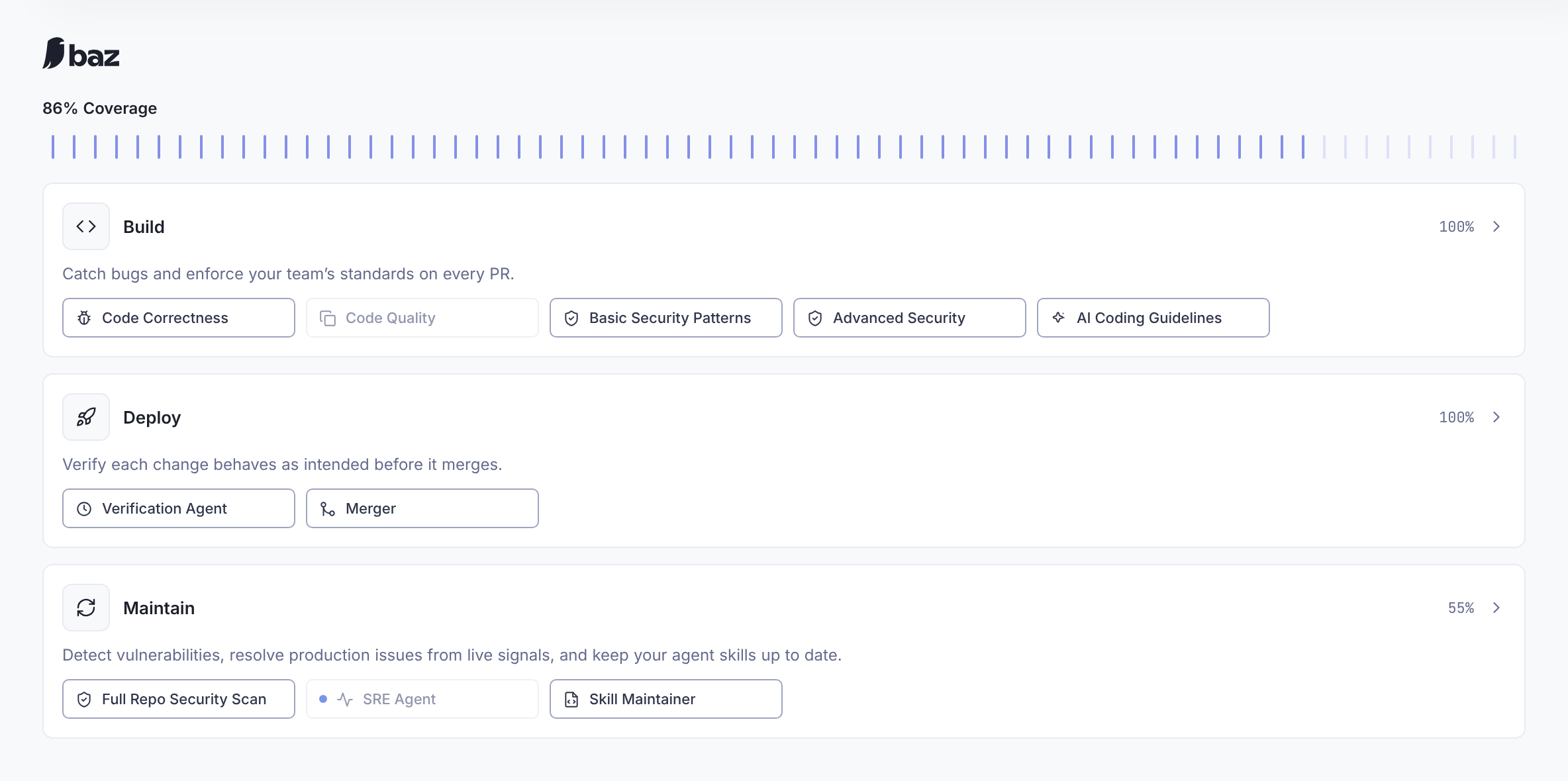
Open **Agents → Baz Agents** to see your organization's Software Factory. It groups every Baz agent into three stages, each with its own page.
The Software Factory: overall coverage, then one card per stage with its agents
| Stage | Focus | Agents |
|---|---|---|
| **[Build](#build)** | Code creation: catch bugs and enforce your standards on every pull request | [Code Correctness](#code-correctness), [Code Quality](#code-quality), [Basic Security Patterns](#basic-security-patterns), [Advanced Security](#advanced-security), [AI Coding Guidelines](#ai-coding-guidelines), [Fixer](#fixer) |
| **[Deploy](#deploy)** | Release readiness: verify each change behaves as intended before it merges | [Verification Agent](#verification-agent), [Merger](#merger) |
| **[Maintain](#maintain)** | Post-deployment: find vulnerabilities, resolve production issues, and keep agent skills current | [Full Repo Security Scan](#full-repo-security-scan), [SRE Agent](#sre-agent), [Skill Maintainer](#skill-maintainer) |
**Coverage.** The coverage bar shows how much of the factory your enabled agents cover, counting the integrations each one needs: write access, a sandbox, an observability tool, and a payment method or credits for usage-based agents. Hover over it to see the step that raises coverage the most, with a link to where to take it. Each stage page has its own coverage bar and a notice when one of its agents is off or not fully set up.
**Setup banner.** When something is missing across the factory, such as write access, a sandbox, an observability integration, or a payment method, a banner under the coverage bar names it. **Connect** opens a guided setup that walks through write access, the sandbox, the usage-based agents, and payment, in order.
**Stage cards.** An agent that is off appears dimmed. A blue dot marks an agent waiting on an integration, such as the SRE Agent without an observability tool. Select a card or an agent to open the stage page.
**Stage pages.** Each page lists the stage's agents with an on/off switch per agent. Select an agent's row to open its settings. **View Interactions** and **View Evaluation** open that stage's activity in [Insights](/docs/insights/evaluation).
**What each agent needs.** An agent counts toward coverage only once its prerequisites are in place:
| Agent | Needs |
|---|---|
| Code Correctness, Code Quality, Basic Security Patterns, AI Coding Guidelines | Nothing beyond installing Baz |
| Verification Agent | A ticketing integration |
| Merger | Nothing to start. Write access for **Auto approve** |
| Advanced Security | A payment method or credits |
| Fixer | A payment method or credits, write access, and a sandbox |
| Full Repo Security Scan | A payment method or credits, a security scan budget, write access, and a sandbox |
| SRE Agent | A payment method or credits, an observability integration, write access, and a sandbox |
| Skill Maintainer | A payment method or credits, and write access |
**Excluded paths.** Admins can exclude paths from every agent with **Exclude paths → Select Paths** at the top of the Software Factory page, for example generated code or test snapshots.
For a short setup checklist, see [Getting Started](/docs/getting-started). Agents you write yourself live under **Agents → Customized Agents**. See [Custom Reviewers](/docs/agents/customized-agents/custom-reviewers).
## Build
The Build stage reviews every pull request. Its page shows findings, time to merge, and acceptance rate for the stage, then one row per review agent, then the Fixer settings.
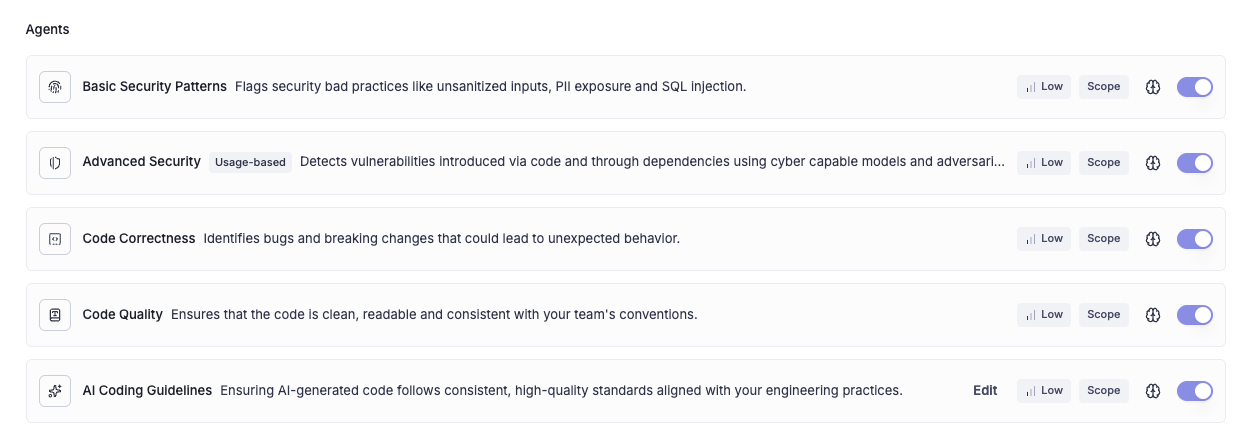
The Build stage: each review agent has its own severity, path controls, and switch
| Agent | Covers | Default |
|---|---|---|
| **Code Correctness** | Logical bugs, breaking changes, and type inconsistencies | On |
| **Code Quality** | Duplication, conventions, conciseness, naming, typos, and hygiene | Off |
| **Basic Security Patterns** | Common security weaknesses | On |
| **Advanced Security** | Contextual security investigation | Usage-based |
| **AI Coding Guidelines** | Your repository's instruction files | On |
Each row shows how many findings the agent produced (in scope) and how many were accepted, with controls for the agent's severity, paths, and memory.
### Severity and paths per agent
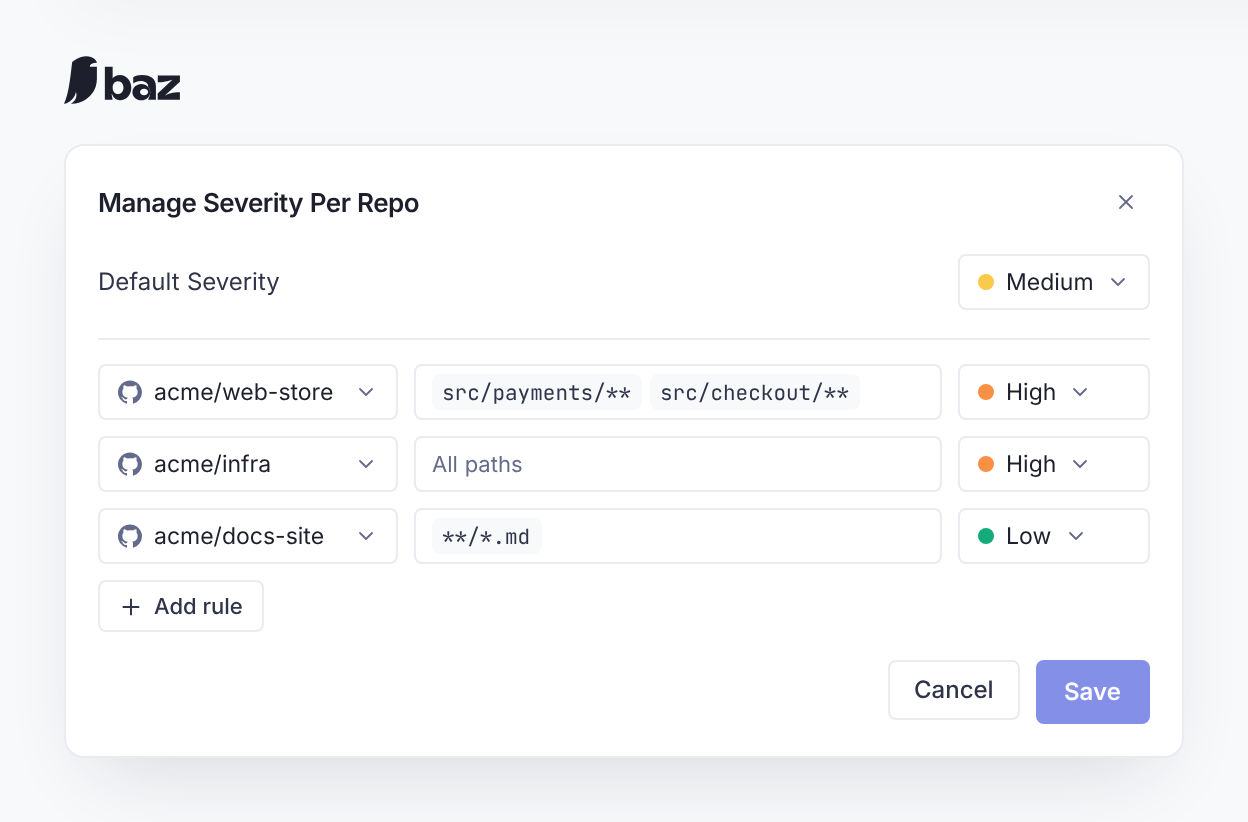
* **Severity.** The severity button shows the agent's minimum severity (High, Medium, or Low). Findings below it are not posted. Select it to see how many repository rules use each level, then **Edit** to open **Manage Severity Per Repo**. Admins set a **Default Severity** and add rules that apply a different minimum to one repository, or to paths in it using glob patterns such as `src/**` or `**/*.ts`. A rule with no paths covers the whole repository. Baz checks rules before saving: each rule needs a repository, paths must be valid glob patterns, a rule's severity must differ from the default, and a repository and path can have only one rule. A confirmation then lists how many rules were added, updated, and deleted.
* **Paths.** **Paths** limits the agent to specific repositories and paths, so it can run on some parts of the codebase and not others.
Manage Severity Per Repo: a default minimum, plus stricter or looser rules for specific repositories and paths
### Code Correctness
Reviews logical bugs, breaking changes, and type inconsistencies. Each check runs independently, and a defect that matches more than one check is reported once.
* **Logical bugs:** incorrect logic, incomplete implementations, missing steps, and unintended side effects, with a trace of the failing execution path.
* **Breaking changes:** contract or API surface changes tied to the consumers that would fail, with exact locations and suggested mitigations. A change is called breaking only with direct evidence that a consumer is affected.
* **Type inconsistencies:** type changes that could cause runtime or integration problems, especially where code meets external systems.
It reads the PR title and ticket, the diff, public API and type definitions, consumer code, and the code paths needed to trace execution from input to output.
### Code Quality
Reviews maintainability: duplicated code, deviations from team conventions, overly verbose constructs, non-descriptive names and typos, and clutter such as commented-out code. It suggests small, behavior-preserving refactors that follow the repository's existing style, and avoids stylistic nitpicks. Code Quality is off by default, so teams choose when to add maintainability feedback.
### Basic Security Patterns
Flags common security anti-patterns: hardcoded secrets, PII in logs, risky SQL or command usage, and missing input validation. Findings name exact locations and skip behavior the framework already handles or test placeholders.
### Advanced Security
Investigates security issues that need more than pattern matching: authentication, authorization, input handling, data exposure, dependency usage, unsafe defaults, and cross-service assumptions. It pulls in surrounding code, related repositories, package context, and runtime signals through Baz's Context Broker to confirm a finding is real before posting it.
Advanced Security is usage-based. Turning it on needs a payment method or credits. See [Secure AI Code](/docs/capabilities/secure-ai-code) for SAST-inside and how organization security rules are picked up.
### AI Coding Guidelines
Enforces the standards your team already wrote for its coding agents. It reads `AGENTS.md`, `CLAUDE.md`, Cursor rules, and Agent Skills in your repository, converts the reviewable rules into guidelines, and applies only those whose directory scope covers the changed files. Every finding cites the guideline file behind it, and the agent never infers a convention that is not in one of your files. It is skipped when no guideline is in scope. Select its row to see which files are in use. See [Skills & Instructions](/docs/agents/skills-and-instructions).
### Fixer
Commits fixes for Baz findings directly to the pull request.
**Triggering a fix**
* **One finding:** select **Apply fix with Baz** on a Baz review comment.
* **Every finding:** select **Fix all** in the PR description to get one commit per open Baz comment.
* **Automatically:** in the Fixer section of the Build page, turn on **Auto Fixer** for chosen repositories and authors. Matching pull requests get fixes without anyone asking.
**What runs in the sandbox**
1. **Setup.** Baz installs the repository's dependencies, preferring lockfile installs. Go, Node.js, Python, and Rust are supported.
2. **Fix.** The fix agent edits the code. It cannot fetch from the web, install packages, or push.
3. **Lint.** Baz runs your format, lint, and typecheck scripts, including their auto-fix variants. Fixer does not run builds or tests.
4. **Review.** The fix is reviewed by your enabled agents before it is committed.
Fixer needs a payment method or credits, write access, and a [sandbox](/docs/basics/integrations/sandbox). To check how a fix went, open **Settings → Integrations → Sandbox → Session logs** and select **See logs** for the pull request.
## Deploy
The Deploy stage decides whether a change is ready to ship.
### Verification Agent
Checks that the implementation matches the requirements in the ticket and design, and gives each requirement a verdict with evidence: met, partially met, or not met. It records only requirements stated in the source material, and validates them against the code and, when available, the running application. Its pull request report is titled **Spec Reviewer Report**, the agent's earlier name.
Connect a [ticketing integration](/docs/basics/integrations) to turn it on. With a design integration such as [Figma](/docs/basics/integrations/figma), the verdict includes visual checks. With a [sandbox](/docs/capabilities/sandboxed-application-review) or a [preview environment](/docs/basics/integrations/preview-environments), it opens the running application. Select its row on the Deploy page to see integration status and choose the repositories it runs on. **Automatic Spec Review** in [Configurations](/docs/account/configurations) controls where it runs without being asked.
### Merger
Decides whether a pull request is safe to merge once CI passes and the Baz review is satisfied. It returns **merge**, **reject**, or **escalate**, labels the pull request, and can post a comment explaining why. A rule can also turn on **Auto approve**, so Baz approves the pull request on a "merge" verdict (requires write access). Merger never merges by itself: a person, or your repository's own auto-merge, does that.
Turning Merger on with no rules adds a default rule covering all repositories and all authors. Select its row on the Deploy page to edit rules. Each rule sets deterministic bars (for example, fewer than 50 files and no High severity finding) plus a written guideline, and Merger weighs them against the diff, the ticket, and cross-repository links to judge the change's blast radius.
The **Add "Baz Approved" label** switch in the Merger rules adds a "baz approved" label once all Baz findings are resolved, on repositories with no Merger rule. It does not approve the pull request and needs read access only.
See [Merge Automation](/docs/capabilities/merge-automation) for rule settings, verdicts, and Merger Agent Stats.
## Maintain
The Maintain stage works on code that has already shipped.
### Full Repo Security Scan
Scans whole repositories and their dependencies for vulnerabilities, so risk that was never part of a recent pull request still gets reviewed. It is turned on separately from Advanced Security and needs a payment method or credits, a security scan budget, write access, and a [sandbox](/docs/basics/integrations/sandbox). Select its row on the Maintain page to choose repositories and start a scan. See [Secure AI Code](/docs/capabilities/secure-ai-code#full-repository-scan).
### SRE Agent
Finds reliability, performance, and observability risks using production telemetry, and opens pull requests with fixes: missing retries and error handling, inefficient queries, and gaps in logs or metrics. It correlates code with real system behavior so fixes match production usage.
The SRE Agent needs a payment method or credits, write access, a [sandbox](/docs/basics/integrations/sandbox), and an observability integration such as [Datadog](/docs/basics/integrations/datadog). For Datadog, configure [Service Mapping for source code integration](https://docs.datadoghq.com/source_code/service-mapping), and give the application key `error_tracking_read` and `apm_read` permissions (`logs_read_data` is recommended for deeper analysis).
### Skill Maintainer
Keeps your agent instruction files in sync with the codebase. It checks each rule in `CLAUDE.md`, `AGENTS.md`, `SKILL.md`, Cursor rules, and GitHub Copilot instructions in `.github/instructions/` against the current code and pull request history, and opens a pull request to fix contradictions or outdated guidance.
Skill Maintainer needs a payment method or credits, and write access. Select its row on the Maintain page to choose repositories, set a cap on open pull requests, a PR title prefix and branch prefix, and a scan schedule, or start a scan on demand. The row shows the last scan. Scans stay within the cap and your organization's [budget](/docs/account/billing).
## How a review runs
Every pull request review goes through the same steps:
1. **Gate.** Baz decides whether the change needs a review at all, and skips it when it does not.
2. **Explore.** An initial pass over the diff and repository context produces leads, and focused subagents investigate each lead in parallel.
3. **Consolidate.** Findings are scoped to the diff, merged when they share a root cause, and capped so a pull request is not flooded with low-value comments.
4. **Reflect.** Each finding is re-checked against the code, the linked ticket, and past discussions. Findings the code does not support, behavior the ticket names as intended, and concerns the team already discussed are dropped. Findings carried over from earlier commits are re-validated.
5. **Publish.** Remaining findings get a severity and a suggested fix, and are posted as pull request comments and check results.
You can follow these steps for any review in [Sessions](/docs/capabilities/sessions).
## Models
Baz routes each agent to frontier models from Anthropic, OpenAI, and Google, with automatic fallback when a provider is unavailable. Models are updated continuously, so this page does not list versions. In [self-hosted deployments](/docs/account/private-mode), you choose which providers are enabled.
## FAQ
Which agents should we turn on first?
The defaults cover the core review: Code Correctness, Basic Security Patterns, and AI Coding Guidelines. Then follow the coverage bar on the Software Factory page, which points to the step that adds the most coverage, usually connecting a ticketing integration for the Verification Agent and turning on Merger.
How do I turn off an agent or narrow what it reviews?
Open the agent's stage page and use its switch. For Build agents, **Paths** limits the repositories and paths it reviews, and the severity button sets the minimum severity it posts. To skip paths for every agent, use **Exclude paths** on the Software Factory page.
Where did Logical Bugs, Breaking Changes, and the other individual reviewers go?
They are checks inside Code Correctness (logical bugs, breaking changes, type inconsistencies) and Code Quality (dedup and conventions, conciseness, naming and typos, hygiene), and are not toggled separately. Their memories and historical metrics moved to those agents. REST API Best Practices was retired.
How does Baz scale on large codebases?
Baz divides code into chunks, reprocesses only changed files, stores embeddings for similarity search, and filters by organization and repository to keep reviews fast.