---
title: "Working with Agents"
description: "Turn agents on or off, chat with them, read acceptance and severity, and manage their memories."
canonical: "https://baz.ai/docs/agents/working-with-agents"
---
# Working with Agents
Turn agents on or off, chat with them, read acceptance and severity, and manage their memories.
## Turn agents on or off
Admins manage every agent from **Agents → Baz Agents**, the [Software Factory](/docs/agents/baz-agents#the-software-factory). Select the **Build**, **Deploy**, or **Maintain** card, then use the switch on the agent's row. Changes apply to the whole organization.
Before turning a review agent off, consider narrowing it instead. On the Build page, **Paths** limits an agent to specific repositories and paths, and the severity button sets the minimum severity it posts, per repository if needed. To skip paths for every agent, use **Exclude paths → Select Paths** on the Software Factory page, with [glob patterns](https://code.visualstudio.com/docs/editor/glob-patterns). See [Severity and paths per agent](/docs/agents/baz-agents#severity-and-paths-per-agent).
Each review agent is configured as a whole. Logical bugs, breaking changes, and type inconsistencies are checks within Code Correctness, and duplication, conventions, conciseness, naming, typos, and hygiene are checks within Code Quality, so they are not toggled individually.
Baz disables an agent automatically when its acceptance rate in your organization falls below 25% after at least 10 findings. Code Correctness is never disabled automatically, and an agent you enable manually gets a 4-day grace period.
## Chat with an agent
Reply to any Baz finding, in GitHub, GitLab, or Baz, to ask a follow-up question, request a clarification, or tell the agent it made a mistake, as you would with a human reviewer. Repeated feedback becomes a [memory](#memory) that shapes future reviews.
On every new commit, Baz also checks whether earlier findings were addressed and says so on the thread, and it comments on failed CI checks with the log line that caused the failure.
## Track acceptance rates
Baz measures, per agent, how many suggestions led to real code changes. No setup is needed. Open **Agents → Baz Agents → Build**: each agent's row shows its in-scope and accepted counts, and the top of the page shows findings, time to merge, and acceptance rate for the stage. For trends and comparisons, use [Insights → Evaluation](/docs/insights/evaluation).
See [Evaluation](/docs/insights/evaluation#definitions) for exactly how a finding is counted as accepted.
## Findings severity
Baz findings include a **severity level** to help users quickly understand the potential impact of an issue and prioritize fixes.
Baz findings are categorized into three severity levels:
* **High Severity -** Issues that may cause runtime failures, data corruption, security risks, or broken functionality.
* **Medium Severity -** Issues that may introduce bugs, risky logic, or maintainability problems that could lead to incorrect behavior over time.
* **Low Severity -** Minor improvements that do not affect correctness but can improve clarity, maintainability, or consistency.
Example:
High Severity Finding
## Memory
When you chat with any Baz Reviewer, you help make its system prompt better. Every interaction with Reviewer is persisted into the reviewer-specific memory bank.
A memory is created when users provide similar feedback over comments more than once. At that point, the system prompt of that agent updates, and the memory appears under **Memory** on the agent's row in the Software Factory. Reviewer prompts that are automatically updated due to memories are versioned so you can always revert to past versions if you don't agree with the comments users in your org contributed.
Respond back to Baz to create memories
### Memory sources
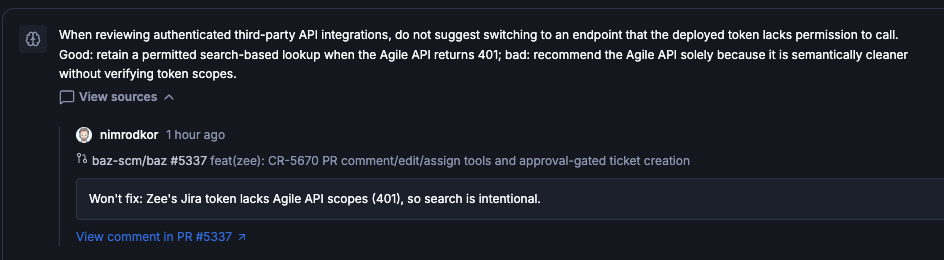
Every memory links back to the discussions that created it, so you can see why an agent behaves the way it does before deciding whether to keep it. Select **Memory** on an agent's row, then **View sources** under a memory. Each source shows the comment author, the pull request it was left on, and the comment itself, with a **View comment in PR** link to the original thread.
A memory with its source discussion: the author, the pull request, and the comment
### Memory governance
Each memory has its own switch in the agent's **Memory** panel, so a memory that should not shape reviews can be disabled and enabled again later. Two organization-wide settings under **Baz → Settings → Configurations → Review Visibility & Controls** control how new memories are created:
| Setting | Description |
| --------------------------------- | ------------------------------------------------------------------------------------------------- |
| Who can contribute to memories | Whose feedback Baz learns from when creating or updating memories: all users, experts and admins (Enterprise), or admins only |
| Disable new memories by default | New memories are created disabled and take effect only once an admin enables them |
With **Disable new memories by default** on, memories go live only after review: check the sources of each new memory, then enable the ones you agree with.
## FAQ
How can I turn off a specific agent?
Open its stage page under **Agents → Baz Agents** and use the switch on its row. Checks inside an agent, such as breaking changes within Code Correctness, are not toggled separately. To reduce noise without turning an agent off, raise its minimum severity or narrow its paths.
How do I chat with an agent?
Reply to its comment in GitHub, GitLab, or Baz. You can ask follow-up questions, request clarifications, or correct it. Repeated feedback becomes a memory.
How does memory work?
When similar feedback recurs, Baz creates a memory that updates the agent's system prompt. Memories are versioned, so you can revert, and each one links to the discussions that created it.
Can I approve memories before they affect reviews?
Yes. Turn on **Disable new memories by default** in Configurations. New memories are then created disabled, and an admin reviews each one, including its source discussions, and enables it from the agent's **Memory** panel.