Monday
Baz's Monday Integration
By pulling in ticket information like titles, descriptions, statuses, owners, groups, updates, and connected sub-tickets, Baz ensures that every change request is grounded in intent. Reviewers no longer need to switch between Monday and GitHub to understand why a change exists - they get the full context, right where the code is.
Baz uses this context to:
- Enrich AI-generated summaries and topics with your business objectives.
- Tailor prompts to reflect the goals and constraints from the Monday ticket.
- Help reviewers focus on what’s important by aligning code changes to the original intent.
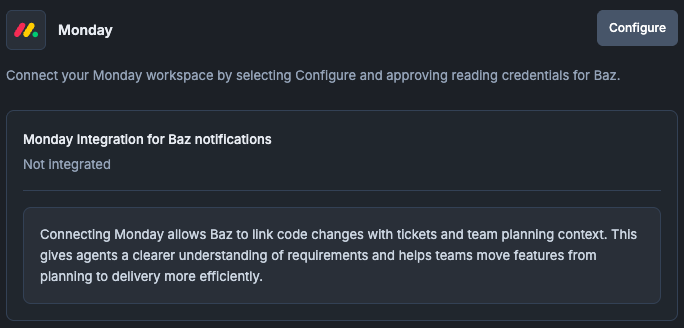
Configuring Baz & Monday
To enable Monday support:
- Go to the Monday integration located in Settings > Integrations.
- Click Configure and follow the authentication flow.
- Once connected to your Monday Workspace, Baz will automatically attach tickets context to linked change requests.
Tip:
Baz detects relevant Monday tickets when the branch name includes a Monday ticket ID.
How Baz Uses Monday Ticket Data
When connected, Baz pulls:
- Ticket name and description - used to shape review summaries and reasoning.
- Status, priority, and group - helps set reviewer expectations.
- Owners and contributors - injected into review prompts to guide validation.
- Updates and discussion threads - used to enrich reviewer understanding.
This context flows through all downstream Baz workflows:
- Summaries reflect the purpose of the story.
- Break down topics based on feature or flow relevance.
- Guide reviewers to evaluate changes through the lens of what the ticket was designed to accomplish.
FAQ
How does Baz know which Monday item a change relates to?
From a Monday ticket ID in the branch name.
What does Baz read from Monday?
Ticket name and description, status, priority and group, owners and contributors, and updates and discussion threads.
Does connecting it change what reviewers see in the code host?
Yes, in the sense that the review itself gets richer: summaries, topics, and agent prompts carry the intent from Monday, so reviewers do not have to open the tracker to understand why a change exists.
Nothing is attached to my pull request, what should I check?
Check that the integration is connected under Settings, Integrations, that the branch name or pull request description carries a recognizable identifier, and that the connected account can see the item in Monday.