Merge Automation
Merger, auto approve, and auto resolve: how Baz acts on merge readiness instead of only reporting it.
Merge automation covers everything Baz does once a review is finished: the Merger agent that judges whether a pull request is ready, the approval it can submit on its own, and the review threads it can close. Each part is configured separately, so a team can adopt merge readiness as a signal first and let Baz act on it later.
Merger
Merger is an agent that evaluates open pull requests for merge readiness and returns one verdict per pull request: merge, reject, or escalate. It exists to clear stale queues without asking a human to re-check the same signals on every pull request.
What Merger weighs
| Signal | Description |
|---|---|
| CI state | Whether required checks have passed, failed, or are still pending |
| Unresolved Baz findings | Open review comments that have not been addressed |
| PR metadata | Title, description, labels, and linked tickets |
| Diff context | The actual change, not just its metadata |
| Repo impact | How broad or risky the change is within the repository |
| Git history | Prior commits and related changes in the same area of the codebase |
| Merge rules | The deterministic bars and written guideline you configured |
| Org guidelines | Team-specific review and merge conventions |
Verdicts
A merge verdict means the required signals are satisfied and the change is safe to move forward. A reject verdict means the change has issues that should block it, such as failing CI or unresolved critical findings. An escalate verdict means the change carries enough risk, ambiguity, or business impact that a human should decide, which is what Merger returns for failed or pending CI, open critical findings, and changes it identifies as high impact.
Merger labels the pull request with its verdict and, when the rule enables it, posts a comment explaining the decision. Escalation is the safety valve: Merger acts on its own only when the standard signals clear the change, and defers to a human reviewer otherwise.
Configuring merge rules
Merger is enabled and configured per rule from Baz → Agents → Baz Agents → Merger. A rule scopes Merger to repositories and sets the bars a pull request has to clear before Merger will call it ready.
| Rule setting | Description |
|---|---|
| Repositories | Which repositories the rule applies to, or all of them. Merger rules apply to GitHub repositories |
| PR authors | Limit the rule to specific authors, or leave it open to all |
| Excluded paths | Paths that disqualify a pull request from the rule |
| Max lines changed | An upper bound on diff size |
| Max files changed | An upper bound on the number of touched files |
| Findings | A severity bar (high, medium, low) per agent, so an open finding of that severity blocks the verdict |
| Guideline | Free text telling the agent how to judge the changes this rule covers |
| Explanation as a PR comment | Whether Merger posts the rationale behind its decision on the pull request |
Once a rule is in place, merge readiness is evaluated automatically for every new pull request and every new commit in the repositories it covers.
Merger Agent Stats
Merger’s track record is tracked in Insights → Evaluation → SDLC Agents, so trust in the agent rests on outcomes rather than a one-time impression.
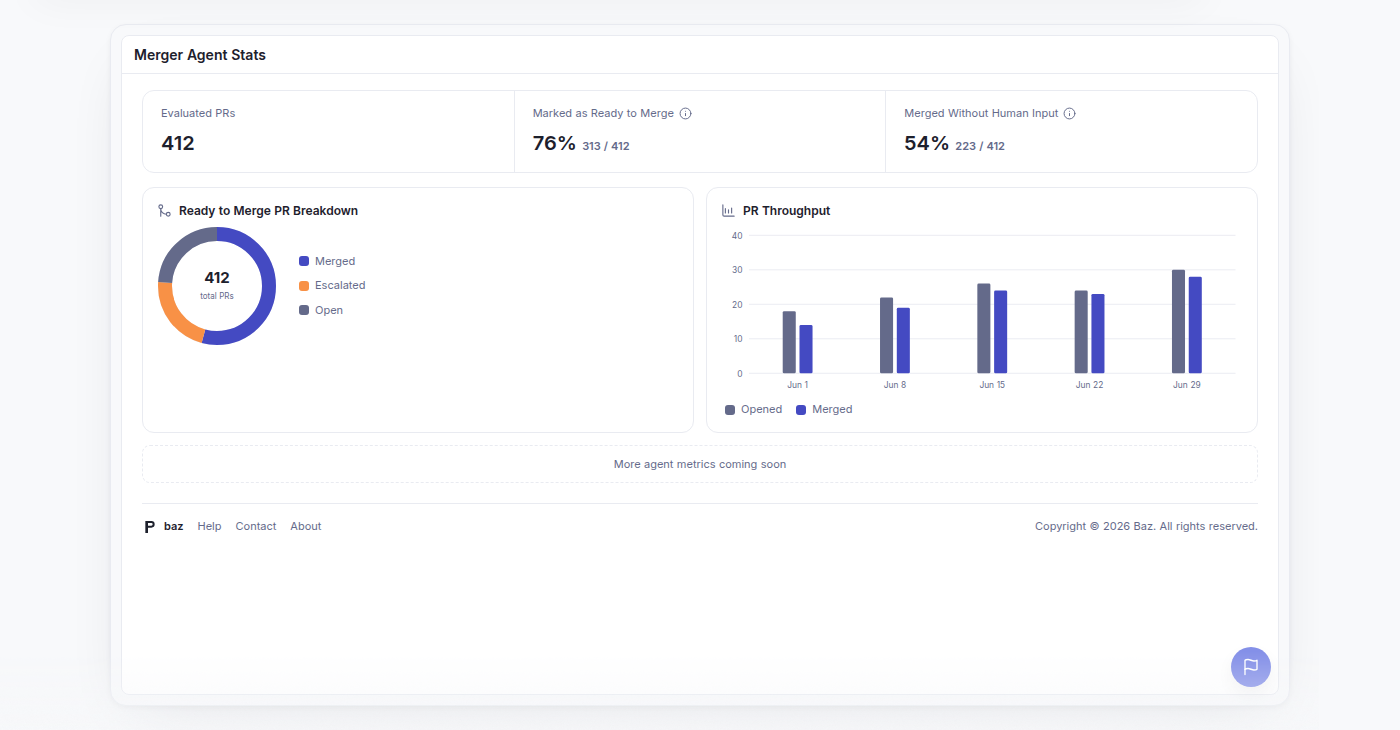
| Metric | Description |
|---|---|
| Evaluated PRs | How many pull requests Merger assessed |
| Marked as Ready to Merge | The share of evaluated pull requests where Merger recommended merging |
| Merged Without Human Input | The share of those that merged with no follow-up commits after the recommendation |
| Ready to Merge PR Breakdown | How the recommended pull requests split across their current status: merged, open, or closed |
| PR Throughput | Pull requests opened against pull requests merged over time |
If the agent is not enabled yet, the tab says so and links straight to the Merger agent drawer instead of showing empty charts.
Auto approve
Auto approve is configured in Baz → Settings → Configurations → Auto approve, which offers three independent controls.
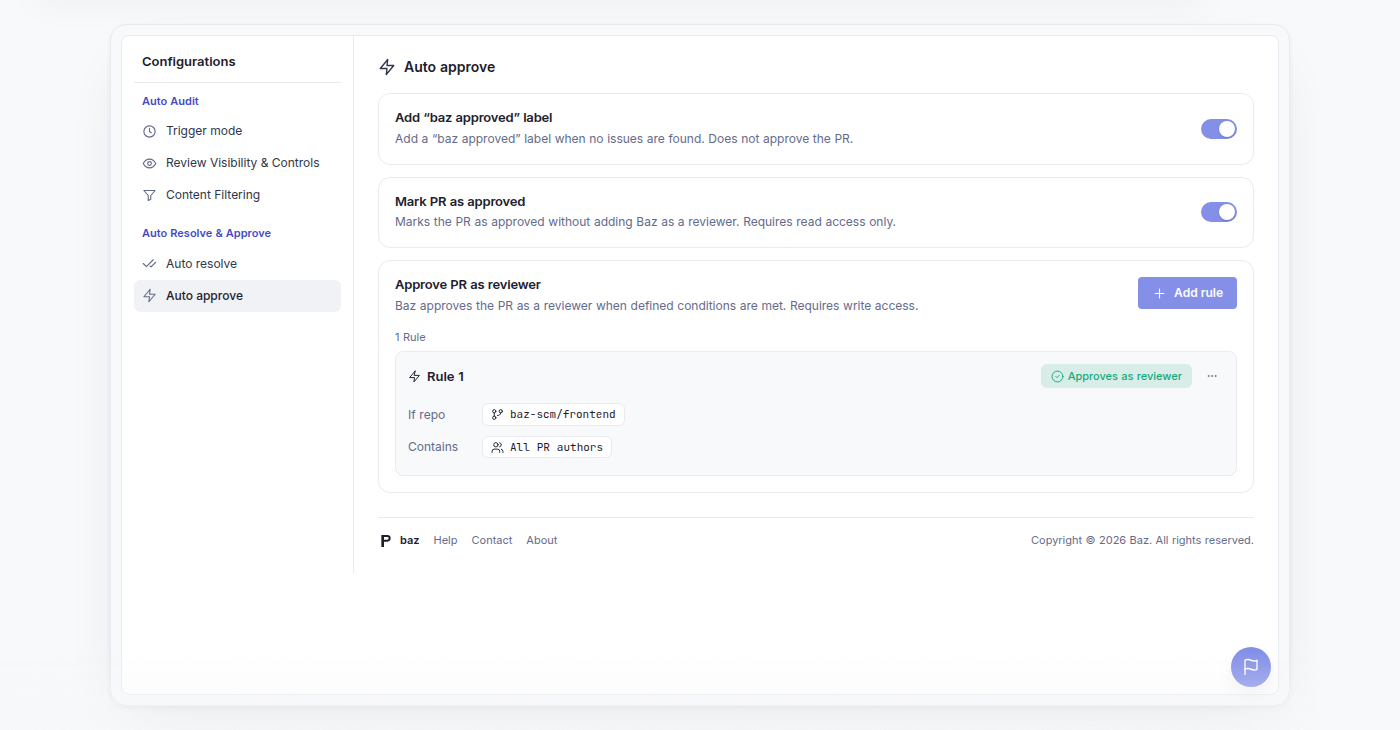
Add “baz approved” label adds a label when no issues are found. It does not submit a review and does not approve the pull request.
Mark PR as approved marks the pull request as approved without adding Baz as a reviewer, and needs read access only.
Approve PR as reviewer is rule-based: Baz submits an approving review, as a reviewer, when a rule’s conditions are met. This requires write access. Each rule scopes to repositories and authors, then adds any of the conditions below, and ends in an action, either approve or do not approve, so a rule can also be used to hold approval back on a matching pull request.
| Condition | Description |
|---|---|
| Excluded paths | Paths that disqualify the pull request from the rule |
| Max lines changed | An upper bound on diff size |
| Max files changed | An upper bound on the number of touched files |
| Findings | A severity bar per agent that must not be exceeded |
If any condition of a rule is not satisfied, no approval is added.
Auto resolve
Auto resolve is configured in Baz → Settings → Configurations → Auto resolve.
Reply to resolved discussions controls how Baz marks addressed comments. It can reply to all relevant threads or only to Baz threads, and it can reply either as a comment stating which commit addressed the discussion or as a 👍 reaction on the original message.
Auto resolve rules decide when Baz closes a thread outright, scoped to repositories and discussion authors. One condition is always enforced and needs no configuration: Baz resolves a thread only if a later commit already addressed the comment, or if the feedback was explicitly rejected.
FAQ
Does Merger merge pull requests on its own?
Only where the standard signals clear the change and your merge rules allow it. Failed or pending CI, open critical findings, and changes Merger reads as high impact are escalated to a human instead of guessed at.
What is the difference between the "baz approved" label and approving as a reviewer?
The label is a marker Baz adds when no issues are found. It does not submit a review. Approving as a reviewer submits a real approving review on the pull request, requires write access, and only happens when one of your auto approve rules matches.
Can Baz resolve a thread that was never addressed?
No. Resolution always requires either a later commit that addressed the comment or feedback that was explicitly rejected. Your rules narrow that further by repository and discussion author.
Why does Merger show no data in Insights?
The SDLC Agents tab needs the Merger agent enabled before it has anything to report. Until then it shows a prompt linking to the Merger agent drawer.