---
title: "Planner"
description: "Generate a repository-aware implementation plan before code is written, then review and approve it."
---
Planner generates an implementation plan before any code is written. Instead of letting a coding agent jump straight into edits, Planner analyzes the request against the current state of your repositories and produces a plan that a human can read, question, and approve.
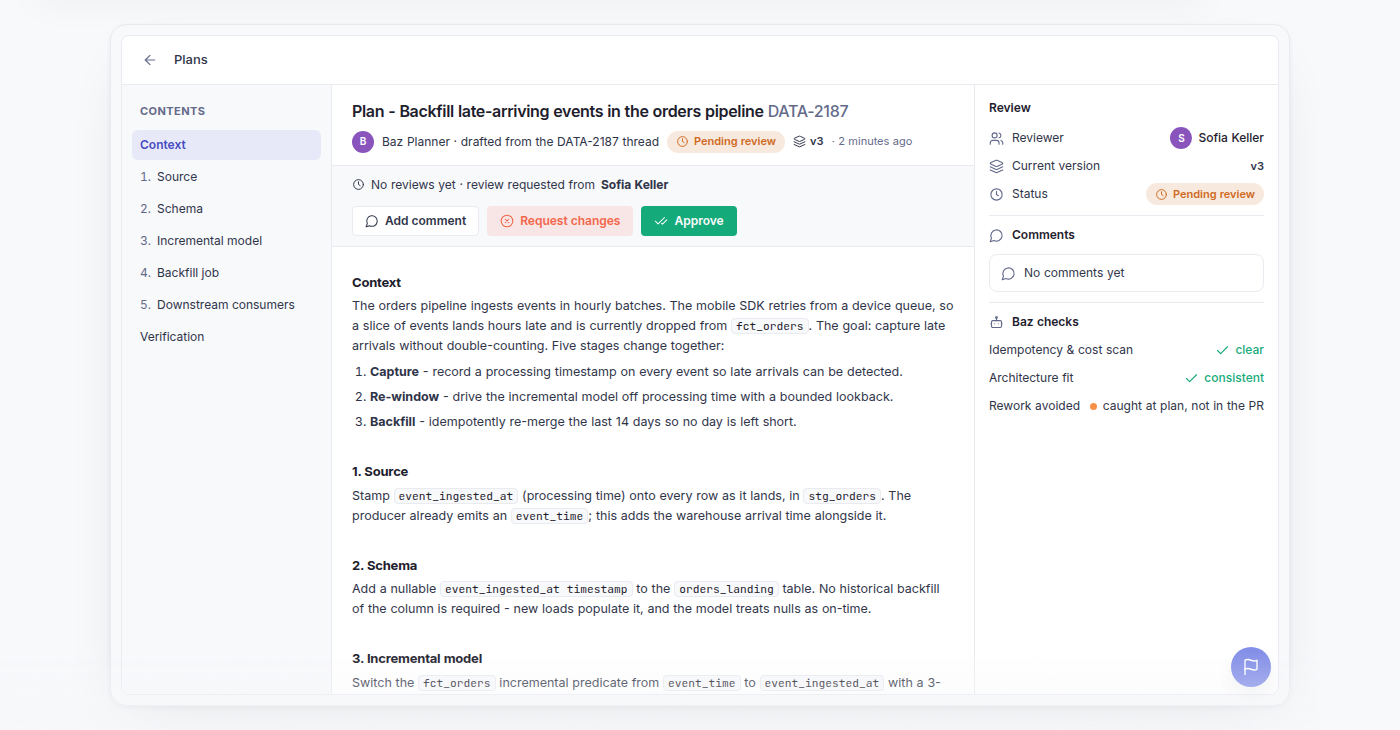
A plan open for review, with its sections, version, and review actions
## Starting a planning session
Planning starts from a coding agent with the [Baz plugin](/docs/basics/plugins) installed:
```
/baz:plan-with-baz
```
The command kicks off a planning run scoped to the task at hand. The agent explores the relevant repositories, including ones you have never cloned, before producing a plan, rather than proposing changes from the prompt alone.
## Pulling comments back into the CLI
Run `/baz:get-plan-comments` in Claude Code, `get-plan-comments` in Codex, or `/get-plan-comments` in Cursor, from the same session that owns the plan, to bring every comment back into the terminal and update your plan accordingly.
## What a plan captures
| Section | Description |
| ------------------------- | ------------------------------------------------------------------------ |
| Affected repos and files | Every repository and file the change is expected to touch |
| Change sequence | The order operations should happen in, including dependent steps |
| Cross-repo coordination | How changes across multiple repositories need to line up with each other |
| Open questions | Ambiguities or decisions that need an answer before implementation |
| Verification steps | How the change should be tested or validated once it is implemented |
Surfacing this before implementation turns architectural and sequencing decisions into something reviewers can weigh in on, instead of discovering them after the fact in a diff.
## Plans workspace
Every plan lives in the Plans workspace, which lists plans across repositories with their current status, so it is clear which are awaiting review, approved, or already in implementation. Opening a plan shows its sections, affected files, and open questions. The workspace is the entry point for reviewers, not just for the person who requested the plan.
## Reviewing and approving a plan
Plan review works like code review, but it happens before the code exists.
### Sharing a plan and requesting review
A plan published from your coding agent lands in Baz, where teammates can open it and review it. Reviewers can be assigned as individual people or as groups. Who can be assigned is based on access to the plan's repositories.
### Commenting on a plan
Select a passage to comment on that exact text, such as a particular file, a step in the change sequence, or an open question, or leave a general comment on the plan as a whole. The plan page places comments beside the content they discuss, so a reviewer reads feedback next to the passage it refers to. The page is also laid out to make long plans easier to navigate.
To act on the feedback, [pull the comments back into your coding agent](#pulling-comments-back-into-the-cli), revise the plan, and publish a new version.
### Versions and outdated comments
Each revision is saved as a new version. When a new version is published, open comments remain visible on it. If the passage a comment was attached to can no longer be found in the new version, the comment is marked **Outdated** instead of being dropped, so feedback does not silently disappear when the plan is rewritten.
### Comparing versions
The comparison view shows what changed between any two versions of a plan, not only consecutive ones. Choose how to read the difference:
| View | Description |
| ------------ | ----------------------------------------------- |
| Rendered | The changes shown in the formatted plan |
| Unified | A single-column diff of the two versions |
| Side by side | The two versions next to each other |
This lets reviewers follow how a plan evolved in response to comments, and check the version they commented on against the one they are approving.
### Diagrams
Plans can include Mermaid diagrams to describe flows, sequencing, or architecture changes. These render inline in the plan view, so reviewers follow the diagram alongside the written plan rather than reading raw diagram syntax.
### Approval
A plan must be explicitly approved before implementation starts. Approving it allows implementation to proceed, and requesting changes sends the plan back with comments attached to the relevant passages. This gate means implementation only begins once a reviewer has signed off on the approach, not just on the eventual code.
### Reviewing on mobile
Plans and their comments work on mobile, so a reviewer can read a plan and its discussion away from a desk.
## Plans and pull requests
When a plan is linked to a pull request, Baz adds a link to the plan in its PR comment. Code reviewers can open the plan from the pull request and see the decisions behind the implementation, including the discussion that shaped them.
## Tracking a planning run
Each planning run is recorded as a session, so the steps behind a plan stay inspectable: the context that was assembled, the requirements that were mapped, the risk gate that ran, and the revisions that followed review. See [Sessions](/docs/capabilities/sessions) for how to read a planning session.
## FAQ
How do I start a plan?
Run `/baz:plan-with-baz` from a coding agent with the Baz plugin installed. Planner scopes the run to the task you describe and gathers repository context before drafting the plan.
How do I read plan comments without leaving my coding agent?
Run `/baz:get-plan-comments` (Claude Code), `get-plan-comments` (Codex), or `/get-plan-comments` (Cursor) from the session that owns the plan. It returns every comment on the plan, so you can address feedback without opening the Plans workspace.
Can implementation start before a plan is approved?
No. Approval is an explicit gate. Until a reviewer approves the current version, the plan stays in review, and reviewers can request changes with comments on specific passages.
What happens to a plan after feedback?
Revisions are saved as new versions. Open comments stay visible on the new version, and a comment whose original passage can no longer be found is marked **Outdated** rather than removed. The comparison view shows what changed between any two versions, rendered, unified, or side by side.
Who can I assign as a reviewer?
Individual people or groups. The available reviewers are based on access to the plan's repositories.
How do code reviewers find the plan behind a pull request?
When a plan is linked to a pull request, Baz includes a link to the plan in its PR comment.
Does Planner work across repositories?
Yes. A plan lists every repository and file the change is expected to touch, and calls out how changes across repositories need to line up with each other.