Pull Requests
The main review workspace in Baz.
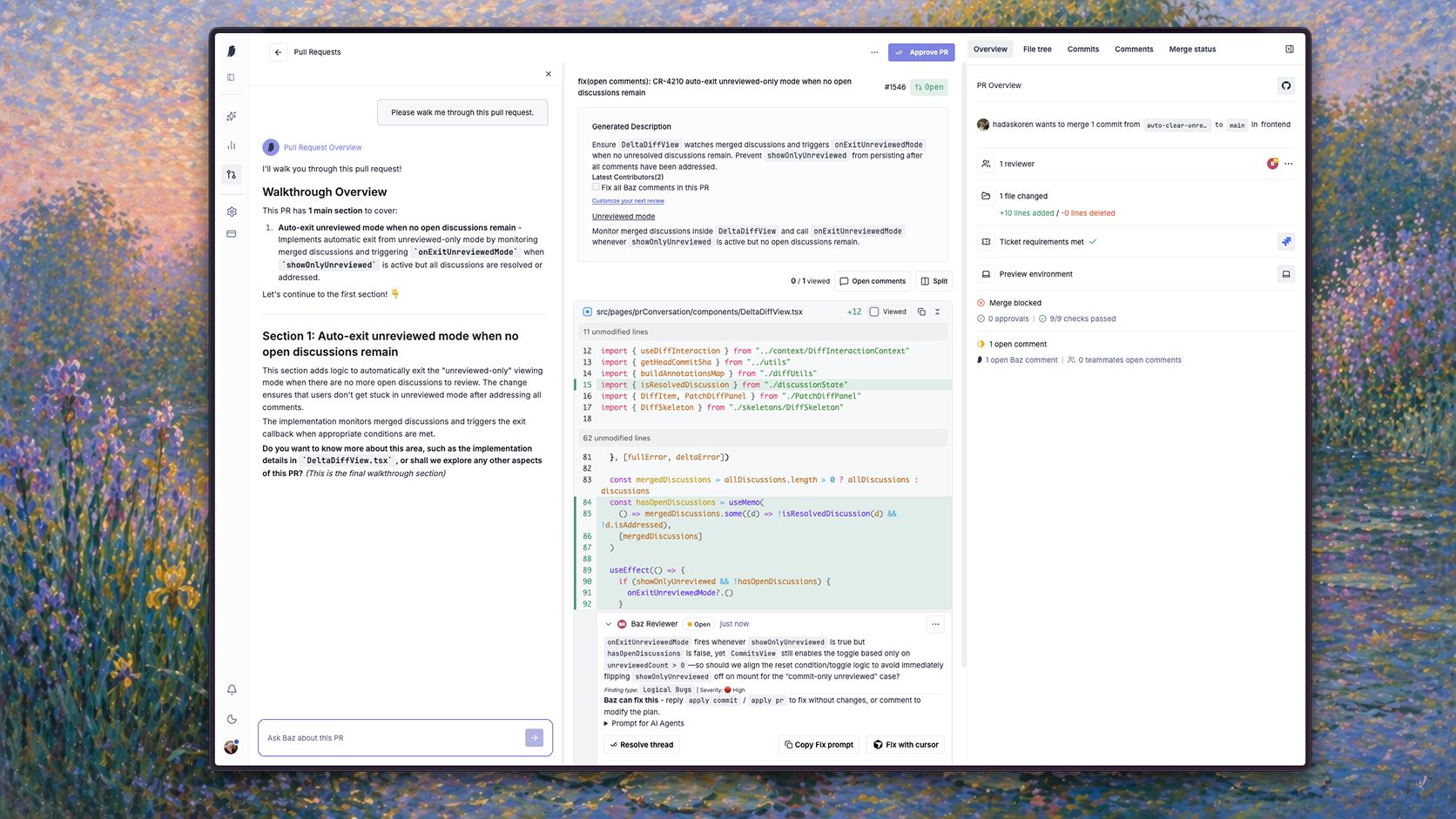
Instead of splitting review work across GitHub tabs, CI , preview deployments, and review tools, Baz brings the entire review flow into a single interface. You can understand the change, inspect implementation details, review comments, validate merge readiness, and approve the PR without leaving the page.
Review Flow
A typical review session in Baz follows a progressive workflow:
| Step | Purpose |
|---|---|
| Walkthrough | Understand what changed and why |
| File Tree | Navigate impacted areas |
| Commits | Review incremental updates |
| Comments | Resolve findings and discussions |
| Merge Status | Validate merge readiness |
The interface is designed around continuous review rather than one-time approval. Baz tracks review state as the pull request evolves so reviewers can focus only on what changed since the last pass.
AI Walkthroughs
When a pull request opens, Baz generates a structured walkthrough of the implementation.
Instead of starting with raw diffs, the walkthrough explains the change in terms of intent, architecture, and impact. This gives reviewers context before they inspect the actual code.
Each walkthrough is divided into implementation sections. For example:
| Section | Description |
|---|---|
| Multi-line selection in diff view | Adds range selection support inside the diff viewer |
| Comment context | Updates interaction state and comment creation logic |
| Selection commenting | Handles active ranges and multi-line discussion behavior |
Each section links directly to the relevant implementation area in the diff.
This becomes especially useful in large pull requests where understanding the purpose of a change matters more than scanning modified lines sequentially.
Pull Request Overview
The Overview tab acts as the operational summary of the pull request.
Baz surfaces the current review state directly inside the PR:
| State | Meaning |
|---|---|
| Open reviewer comments | Review findings still requiring action |
| External comments | Comments created outside Baz |
| Checks passed | CI and validation state |
| Merge blockers | Missing approvals or unresolved discussions |
Instead of manually checking GitHub branch protection rules or CI dashboards, reviewers can immediately see whether the PR is ready to merge.
Navigating the File Tree
The File tree tab organizes all modified files hierarchically.
Each file displays:
| Signal | Purpose |
|---|---|
| Added / removed lines | Understand change size |
| Review indicators | Identify active discussions |
| Directory grouping | Navigate large changesets faster |
This allows reviewers to quickly identify high-impact areas before diving into implementation details.
Files with high churn or concentrated review activity become immediately visible.
Reviewing Commits
The Commits tab focuses on incremental review.
Baz tracks reviewed and unreviewed commits automatically.
During active review cycles, authors often push multiple follow-up commits after feedback. Instead of rereading the entire pull request, reviewers can focus only on changes introduced since the previous review pass.
This makes iterative reviews significantly faster, especially in long-running pull requests.
Managing Review Comments
The Comments tab centralizes all review discussions.
Every finding includes:
| Capability | Description |
|---|---|
| File and line references | Jump directly into implementation |
| Resolution state | Track open and resolved findings |
| Fix prompts | Generate implementation guidance |
| Cursor integration | Send fixes directly into Cursor |
Baz is designed to reduce context switching between review and implementation. Reviewers can move directly from a finding to a fix workflow without manually reconstructing the issue.
Merge Status
The Merge status tab aggregates all merge requirements into a single view.
Baz combines:
| Merge Signal | Source |
|---|---|
| CI checks | GitHub Actions and validations |
| Approval requirements | Repository merge rules |
| Open review threads | Reviewer discussions |
| Merge blockers | Outstanding requirements |
AI Reviewer Reports
Baz reviewers generate structured reviewer reports directly inside the pull request.
Reviewer reports include:
| Component | Description |
|---|---|
| Requirement validation | What the reviewer verified |
| Evidence references | Supporting implementation details |
| File and line mappings | Direct references into code |
| Findings | Problems identified during review |
| Severity classification | Priority and impact level |
Each finding is actionable and connected directly to the relevant implementation area.
Reviewers can resolve findings, rerun reviewers, copy prompts, or apply fixes directly in Cursor without leaving the PR.
PR Inbox: My pull requests
The Changes view has two top-level tabs: My pull requests and All pull requests. All pull requests is the full shared list. My pull requests is the personal inbox, split into two sections on the same page:
| Section | Shows |
|---|---|
| Waiting for review | Pull requests where a review has been requested from you |
| My open PRs | Pull requests you authored |
Each section paginates independently and both reuse the same search, filters, and toolbar as the main pull request list, so switching into your inbox does not reset how you are browsing. A filter or search term you apply carries over, and the current tab is reflected in the URL, so a link to your inbox state can be shared or bookmarked.
This turns the Changes view into a personal inbox on top of the shared repository list: instead of scanning every open pull request to find what applies to you, you can jump directly to the ones that need your attention.
A suggested daily workflow:
- Start with Waiting for review to clear pull requests where teammates are blocked on your feedback.
- Move to My open PRs to check on review progress, respond to comments, and address any outstanding findings on your own changes.
Working the sections in this order keeps you focused on unblocking others first, then catching up on your own open work.
Continuous Review
Baz is optimized for iterative development workflows.
Instead of treating review as a static approval step, Baz continuously tracks:
| Review State | Purpose |
|---|---|
| Unreviewed commits | Detect newly introduced changes |
| Open reviewer findings | Keep review state actionable |
| Merge readiness | Track release eligibility |
| CI progression | Monitor validation state |
| Reviewer activity | Understand review coverage |
FAQ
How do I find the pull requests that need me?
Use the My pull requests tab in the Changes view. Waiting for review lists changes where a review was requested from you; My open PRs lists the ones you authored. Both keep the search and filters you already had applied.
Does Baz re-review after new commits?
Yes. Review is continuous rather than a one-time approval step, so Baz tracks unreviewed commits, open findings, merge readiness, and CI progression as the change evolves.
Can I act on a finding without leaving the pull request?
Yes. Findings can be resolved, reviewers rerun, prompts copied, and fixes applied, including sending a fix straight into Cursor.
Where do I see how a review was produced?
In Sessions, which shows the agents that ran, what they read, and the execution path behind the findings.