---
title: "Software Factory"
description: "How Baz organizes its agents into Build, Deploy, and Maintain stages, and how coverage shows what to turn on next."
canonical: "https://baz.ai/docs/concepts/software-factory"
---
# Software Factory
How Baz organizes its agents into Build, Deploy, and Maintain stages, and how coverage shows what to turn on next.
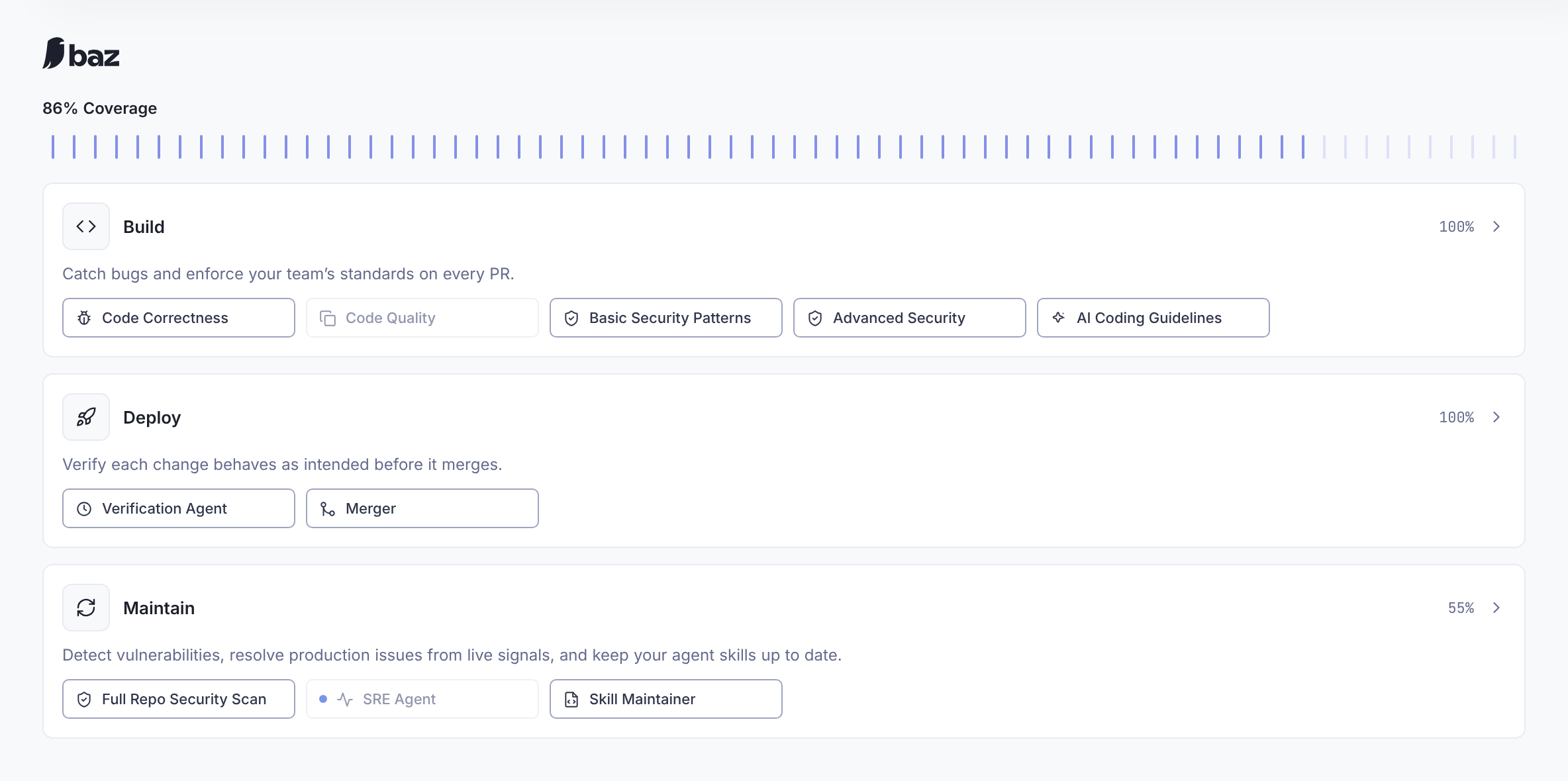
The Software Factory is how Baz groups its agents: one place that shows every agent across the lifecycle of a change, which ones are running, and what each one needs. It is also the first page of the Baz app. Thinking in stages helps you decide what to enable: Build agents review every PR, Deploy agents decide whether a change behaves as intended and is ready to merge, and Maintain agents look after the codebase and production after merge.
The Software Factory page, with coverage and stage cards
## How the stages fit together
**Build** agents check every PR for bugs, quality, and security, and [Fixer](/docs/agents/build/fixer) fixes what they find. **Deploy** agents act before merge: the [Verification Agent](/docs/agents/deploy/verification-agent) checks that the change does what the ticket asked, and [Merger](/docs/agents/deploy/merger) decides if it's ready. **Maintain** agents work after merge: the [Full Repo Security Scan](/docs/agents/maintain/full-repo-security-scan), the [SRE Agent](/docs/agents/maintain/sre-agent), and the [Skill Maintainer](/docs/agents/maintain/skill-maintainer).
Agents in different stages feed each other. Build findings go to Fixer. The SRE Agent and the Full Repo Security Scan open fix PRs, which Build agents then review. Merger reads unresolved findings when it judges merge readiness.
## Coverage
The coverage bar at the top of the page (for example, **86% Coverage**) shows how much of the factory is active for your organization. Hover over it to see the step that adds the most coverage, and select **Click here** to go there. Each stage card shows its own percentage.
A coverage gap shows on the agent that has it, and the message tells you what's missing. Most gaps are fixed by granting Baz write access, setting up a [sandbox](/docs/integrations/sandbox), adding credits, or selecting **Turn on**. For Merger, select **Set rules**.
Below the bar, a setup banner names the first missing prerequisite, such as "Add write access to improve your coverage.", with a **Connect** button. **Connect** opens a guided wizard that walks through write access, sandbox, Skill Maintainer, Fixer, SRE, Advanced Security, and payment.
## What each agent needs
The core review agents only need a connected repository. Agents that change code, such as Fixer, the Skill Maintainer, and the SRE Agent, need write access, and the ones that run code also need a sandbox. Advanced Security and the Full Repo Security Scan are usage-based, so they also need a payment method or credits. See [Agents](/docs/agents) for what each agent needs.
## Related
Configure every agent from the Software Factory.
How the stages connect around a pull request.
Severity, scope, and excluded paths per agent.
Plans, credits, and usage-based agents.