Evaluation
How agents are performing across every review: acceptance, coverage, and Merger's track record.
Evaluation aggregates every review Baz has run and shows how the agents are actually performing. It sits under Insights → Evaluation and splits into two tabs: Code Review Agents for the reviewers that comment on changes, and SDLC Agents for the agents that act, starting with Merger.
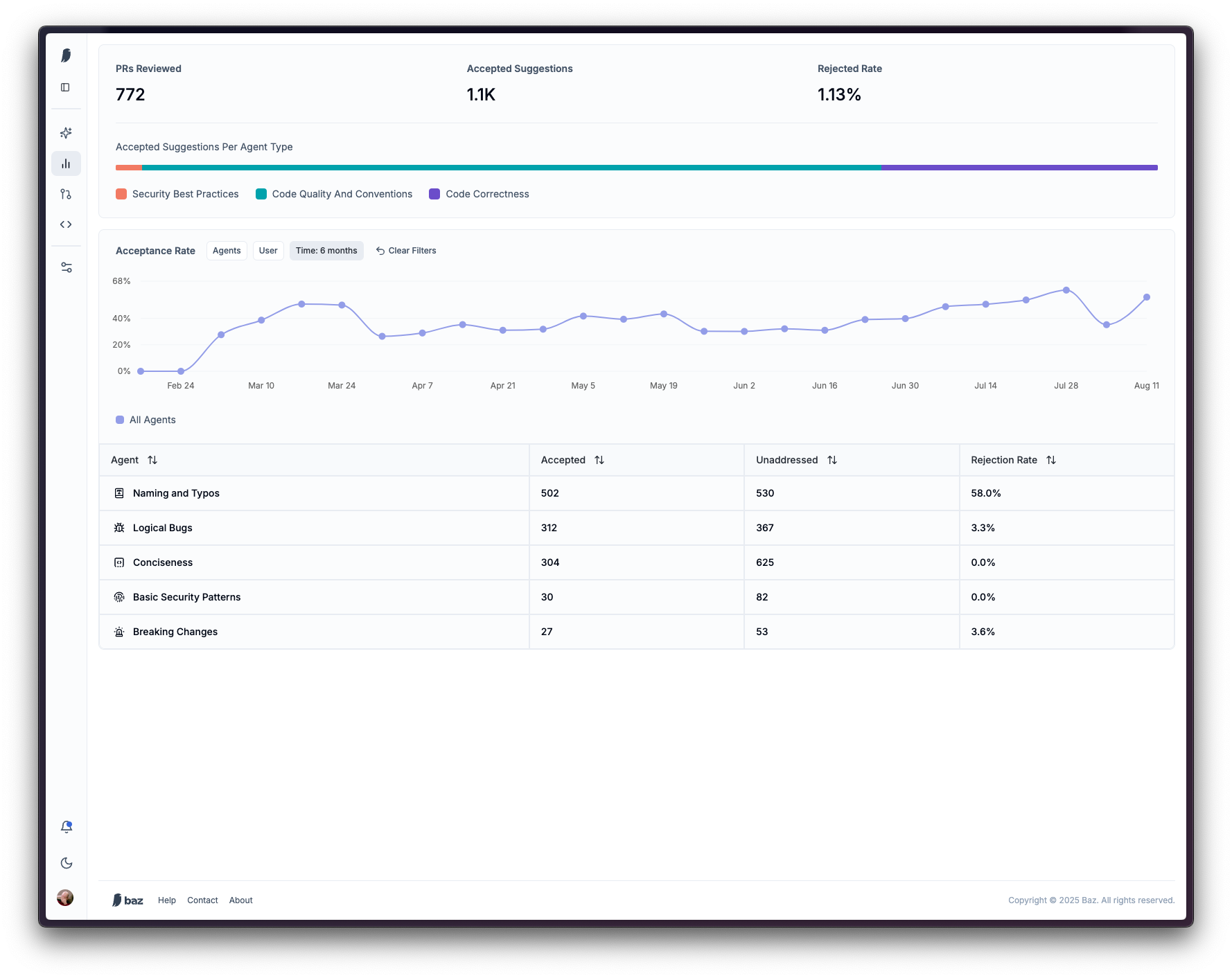
Code Review Agents
Overview
The top of the tab is a snapshot of review activity over the selected window.
| Metric | Description |
|---|---|
| PRs Reviewed | How many changes Baz analyzed |
| Accepted Suggestions | How many suggestions were accepted into code |
| Rejected Rate | The share of suggestions explicitly rejected by reviewers |
| Fixed via Fixer | How many findings were resolved by a Fixer commit, where Fixer is enabled |
Below the stats, Accepted Suggestions Per Agent Type breaks acceptance down by agent category, such as security best practices, code quality and conventions, and code correctness, so it is clear which classes of agent are driving accepted feedback. One accepted suggestion can be associated with more than one agent type. Where Fixer is enabled, the same breakdown can be switched to show suggestions Fixer fixed instead of suggestions developers accepted.
Coverage
Coverage answers a different question from acceptance: not how much of what Baz said was taken, but how much of what was there Baz found. It shows the total number of comments alongside a per-category count, with a radar chart of the same categories, so gaps in coverage are visible next to the categories Baz reports heavily on. Where other AI reviewers are active on the same repositories, their real-bug recall for the window appears beside Baz’s as a set of vendor badges.
Acceptance rate
The acceptance rate section carries a trend chart and a per-agent table, filtered together.
| Column | Description |
|---|---|
| Agent | The agent that produced the comments |
| Accepted | Comments positively received or fixed by a commit |
| Unaddressed | Comments that got no response and were not fixed in any commit |
| Acceptance Rate | Accepted comments as a share of addressed and unaddressed comments |
| Rejection Rate | Comments that received negative feedback from developers |
| Fixed via Fixer | Comments resolved by a Fixer commit, where Fixer is enabled |
Three filters apply to this section: Agents and User, both multi-select, and Time, a single choice of 1 week, 2 weeks, 1 month, or 6 months, defaulting to 1 month. With no agent filter applied, per-vendor acceptance rates for other AI reviewers appear alongside Baz’s, which is how a team compares Baz against another reviewer running on the same code.
SDLC Agents
The SDLC Agents tab tracks the agents that take action rather than comment. Today that is Merger Agent Stats: evaluated pull requests, the share marked ready to merge, the share that merged with no human follow-up, a breakdown of recommended pull requests by current status, and throughput over time. If Merger is not enabled, the tab says so and links to the agent instead of showing empty charts. See Merge Automation for what those metrics mean and how Merger reaches a verdict.
How to use it
Open Insights → Evaluation and start on Code Review Agents. Narrow to the agents, users, and window you care about, compare acceptance across agent types to see where the value is concentrated, then read Coverage to find the categories nobody is catching. Track the trend over successive windows to see whether review quality is improving, and switch to SDLC Agents to check whether Merger’s calls are holding up.
FAQ
What metrics does this dashboard provide?
Changes reviewed, accepted suggestions, rejected rate, fixes applied by Fixer, acceptance broken down by agent type and by agent, acceptance trend over time, coverage by finding category, and Merger’s evaluation and merge outcomes.
How do I read "Accepted Suggestions Per Agent Type"?
It shows which classes of agent, for example correctness, conventions, or security, are driving the most accepted suggestions. A single accepted suggestion can count toward more than one agent type.
What is the difference between acceptance and coverage?
Acceptance measures what developers did with Baz’s comments. Coverage measures how much of the real issue space was found in the first place, by category, which is where a blind spot shows up even when acceptance looks healthy.
Can I filter by user, time, or agent?
Yes. The acceptance rate section filters by Agents, User, and Time, and the time window also drives the overview stats and the trend chart.
How does Baz compare against another AI reviewer?
When other AI reviewers comment on the same repositories, their acceptance rate and real-bug recall for the window show up beside Baz’s, in the acceptance rate section and in Coverage respectively. Applying an agent filter hides that comparison, since it no longer covers the same population.