---
title: "Plans"
description: "Draft an implementation plan with Baz from your coding agent, review and approve it with your team, and link it to the PR that implements it."
canonical: "https://baz.ai/docs/work/plans"
---
# Plans
Draft an implementation plan with Baz from your coding agent, review and approve it with your team, and link it to the PR that implements it.
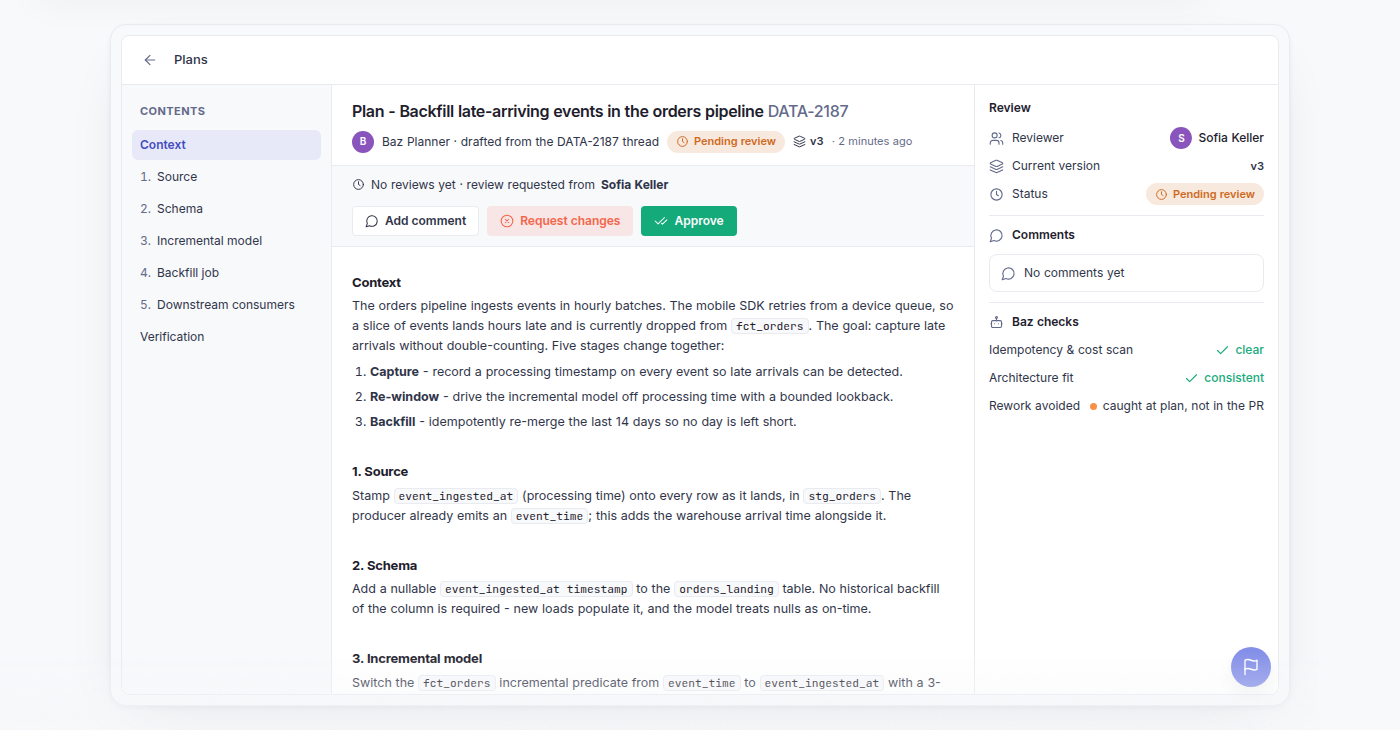
A plan is a reviewable description of a change, written before any code exists. Your coding agent drafts it with Baz's codebase search, publishes it to Baz, and your teammates comment on specific passages and approve it. When the PR arrives, Baz links it to the plan and checks the implementation against it. Catching a wrong approach in a plan costs minutes; catching it in a diff costs a rewrite.
A plan open for review
## The plan lifecycle
A new plan is **Pending** while your team comments and you publish new versions. It becomes **Approved** when a reviewer signs off, and **Implemented** once a PR is linked or you mark it done. You can close a plan at any time and reopen it later. Plan statuses are **Pending**, **Approved**, **Implemented**, **Closed**, and **Deleted**.
## Create a plan
Plans start in your coding agent with the [Planner plugin](/docs/integrations/developer-tools/planner-plugin) installed. The plugin gives Claude Code, Codex, or Cursor indexed search across your repositories, including ones you have not cloned, so the plan is grounded in your actual code.
In Claude Code, run `/baz:plan-with-baz` and describe the task. The agent explores the relevant repositories before drafting.
The agent asks before it uploads the plan to Baz. Publishing is opt-in, once per session.
Open the plan in Baz and set reviewers. You can assign people or groups; who is available depends on access to the plan's repositories.
A plan typically covers why the change is needed, what behaves differently, the affected repositories, decisions and rejected alternatives, open questions, implementation steps per repository, and how to verify it. Plans can include Mermaid diagrams, which render inline.
## Review a plan
Open the plan from **Tasks** (filter **Plans only**) or from its shared link.
- **Comment on a passage.** Select text to comment on that exact passage, or leave a general comment on the whole plan. Filter comments by **All**, **Addressed**, or **Dismissed**.
- **Compare versions.** Each revision is a new version. Choose two versions to compare, and read the difference as **Rendered**, **Unified**, or **Split**. A comment whose passage no longer exists is marked **Outdated** instead of disappearing.
- **Approve.** Select **Approve Plan**. Approval records your sign-off; it does not block implementation. You cannot approve your own plan.
Other actions on the plan page: **Copy plan**, **Share plan**, **Copy Comments**, **Add New Version**, **Mark as implemented**, and **Close plan** or **Reopen plan**.
## Bring comments back to your agent
Pull every comment into the coding session that owns the plan, revise, and publish a new version:
```text title="Claude Code"
/baz:get-plan-comments
```
```text title="Codex"
get-plan-comments
```
```text title="Cursor"
/get-plan-comments
```
The agent can also answer comments directly. These actions use Baz's [MCP tools](/docs/reference/mcp-tools) such as `get_plan_comments`, `respond_to_plan_comment`, and `update_plan`.
## Plans and pull requests
Baz links a PR to its plan when the PR title or description mentions the plan reference (for example `PLAN-12`), when the PR shares a ticket key with the plan, or when Baz matches them by content. Your coding agent can also link them explicitly with `link_plan_to_pr`. A linked plan is marked implemented.
On the PR, **Planned in Baz** in the Overview links to the plan, and the review checks the implementation against the plan's requirements and reports gaps.
## Related
Install Baz in Claude Code, Codex, or Cursor.
Find plans waiting for your review.
Where the plan shows up during code review.
Every plan tool your agent can call.