---
title: "Pull requests"
description: "Read Baz reviews on your Git provider or in the Baz PR page, reply to findings, and take a PR from review to merge."
canonical: "https://baz.ai/docs/work/pull-requests"
---
# Pull requests
Read Baz reviews on your Git provider or in the Baz PR page, reply to findings, and take a PR from review to merge.
Baz reviews show up in two places. On your Git provider, Baz posts a review with inline comments and a check run, so your workflow does not change. In the Baz app, the PR page puts the walkthrough, diff, findings, requirements, and merge status side by side, and lets you approve and merge without switching tools. Both stay in sync: a reply or resolution in one shows in the other.
## On your Git provider
### The review
After each review, Baz posts one review on the PR with inline comments on the affected lines. Each comment carries:
- The **severity**: high, medium, or low. See [Verification protocol](/docs/concepts/verification-protocol#what-you-see).
- What is wrong, how it is triggered, and what it breaks.
- A fix prompt you can copy into a coding agent.
- When Fixer is available, **Baz can fix this** with an **Apply fix with Baz** checkbox. See [Fix findings](/docs/work/fix-findings).
The **Baz Reviewer** check run shows progress and the outcome. On Azure DevOps, Baz uses a PR status instead.
### Talk to Baz in the thread
Reply in a Baz thread, or mention "baz" in any PR comment. There is no fixed syntax: ask a question and Baz answers, or say "this is intended" and Baz can remember it after merge. A few short commands do more: `baz review` runs a review now, `baz summarize` posts a summary, and `apply commit` or `apply pr` starts Fixer on a finding.
On each new commit, Baz checks whether earlier findings were addressed and says so in the thread. See [PR commands](/docs/reference/pr-commands) for every command and label, including `baz: pause` to stop reviews on a PR.
## In the Baz app
Open a PR from **Tasks**, or from a link in a Baz comment.
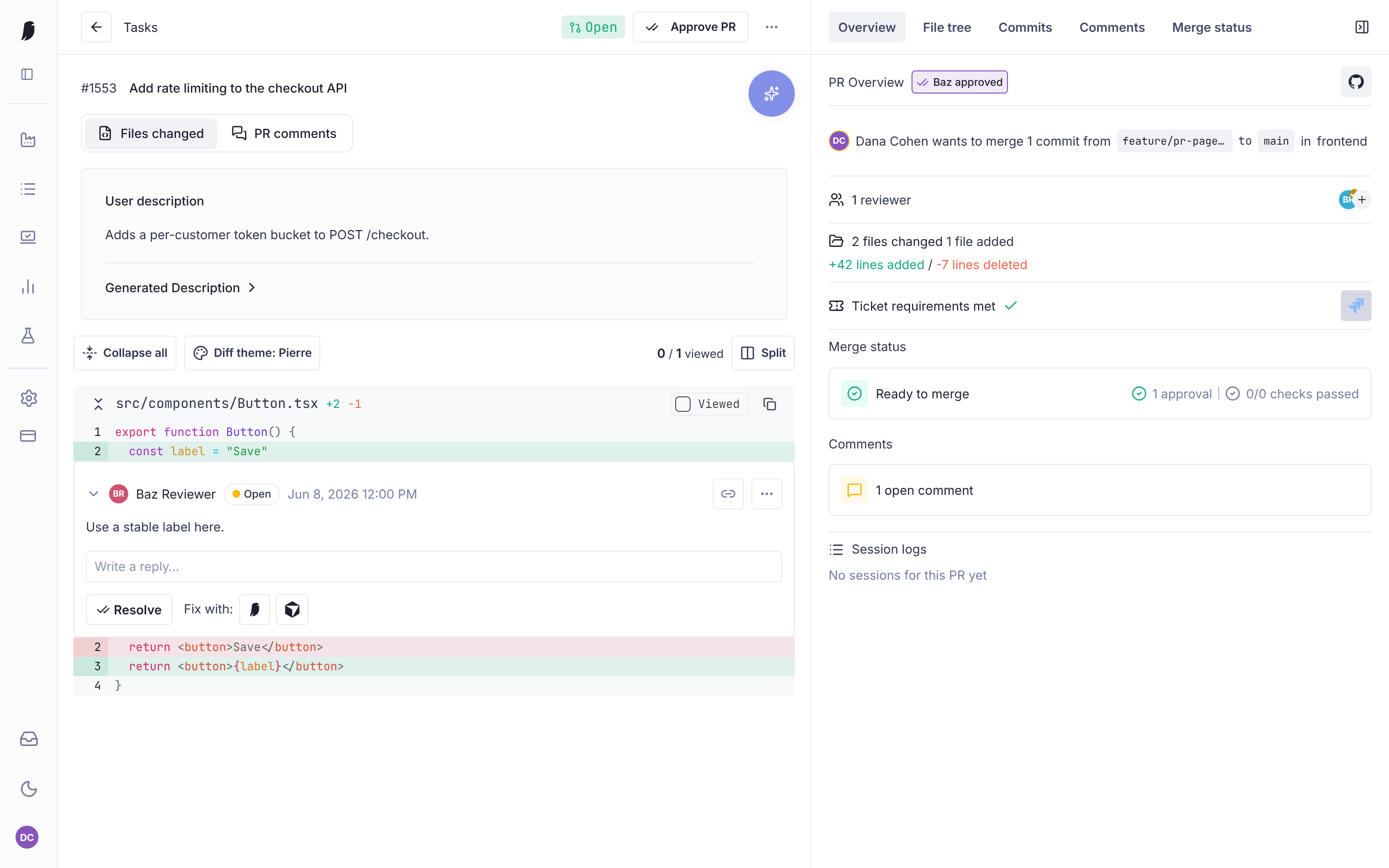
The PR page in the Baz app
### Side tabs
**Overview** sums up the PR and shows whether it meets its ticket, its linked plan, and its preview environment. **Comments** holds every Baz and human comment, and **Commits** lets you review only what changed since your last pass. **Merge status** shows CI checks, approvals, open threads, and anything blocking the merge.
In the diff, use **Expand all** and **Collapse all**, and mark files **Viewed** as you go.
### Act on a comment
Select **Fix with Baz** to have Fixer fix the finding, either as a new commit or a new PR. If you'd rather use your own coding agent, select **Fix with Cursor** or **Copy fix prompt**, or **Copy all prompts** to grab every open comment at once. Admins choose which of these options appear under **Comments fixing options** in [Configurations](/docs/admin/configurations).
### Merge
The top of the page shows the merge state, such as **Ready to Merge**, **Merge Blocked**, or **All checks passed**, with badges like **Baz approved** and **Approved by reviewers**. Select **Approve PR**, then merge with **Merge**, **Squash & Merge**, or **Rebase & Merge**. Actions you take here are performed on your Git provider as you, which needs write access.
### Ask Bazzy
Select **Ask Bazzy** for a chat about this PR: a walkthrough, why CI is failing, or what is blocking the merge. See [Bazzy](/docs/work/bazzy).
## Related
Turn a finding into a commit or a PR.
Ask questions about any PR.
Automate merge readiness under your rules.
Every comment command and label.