Bringing agentic code review to Azure Repos
Baz now supports admin-scoped project and repository selection for Azure Repos, so Azure DevOps teams get the same agentic review workflows as GitHub.

A lot of engineering teams do not get to pick their source control platform. Enterprise procurement, existing Microsoft agreements, or a long-standing internal standard put them on Azure DevOps, and that choice tends to outlive several generations of tooling decisions made around it. None of that should mean losing access to modern, agentic code review.
Baz already reviews pull requests across GitHub with the same reviewer agents teams rely on for correctness, styling, and security. We are extending that to Azure Repos, with an onboarding flow built specifically for how Azure DevOps organizations are actually structured: as a collection of projects, each holding its own set of repositories, often with different owners and different sensitivity levels.
Why scope matters on Azure DevOps
An Azure DevOps organization is not a single flat list of repositories the way a GitHub account often is. It is a container for multiple projects, and those projects frequently belong to different teams, with different compliance requirements and different appetites for bringing in a third-party reviewer. Asking an admin to connect Baz to the entire organization, all projects and all repositories, is the wrong default. It forces an all-or-nothing decision when what most organizations actually want is to onboard one project, prove the value, and expand from there.
That is why Baz's Azure Repos integration is admin-scoped from the start. An Azure DevOps admin connects Baz through Microsoft OAuth, then chooses exactly which projects and repositories Baz can see and review. Nothing outside that selection is touched.
A picker built around projects
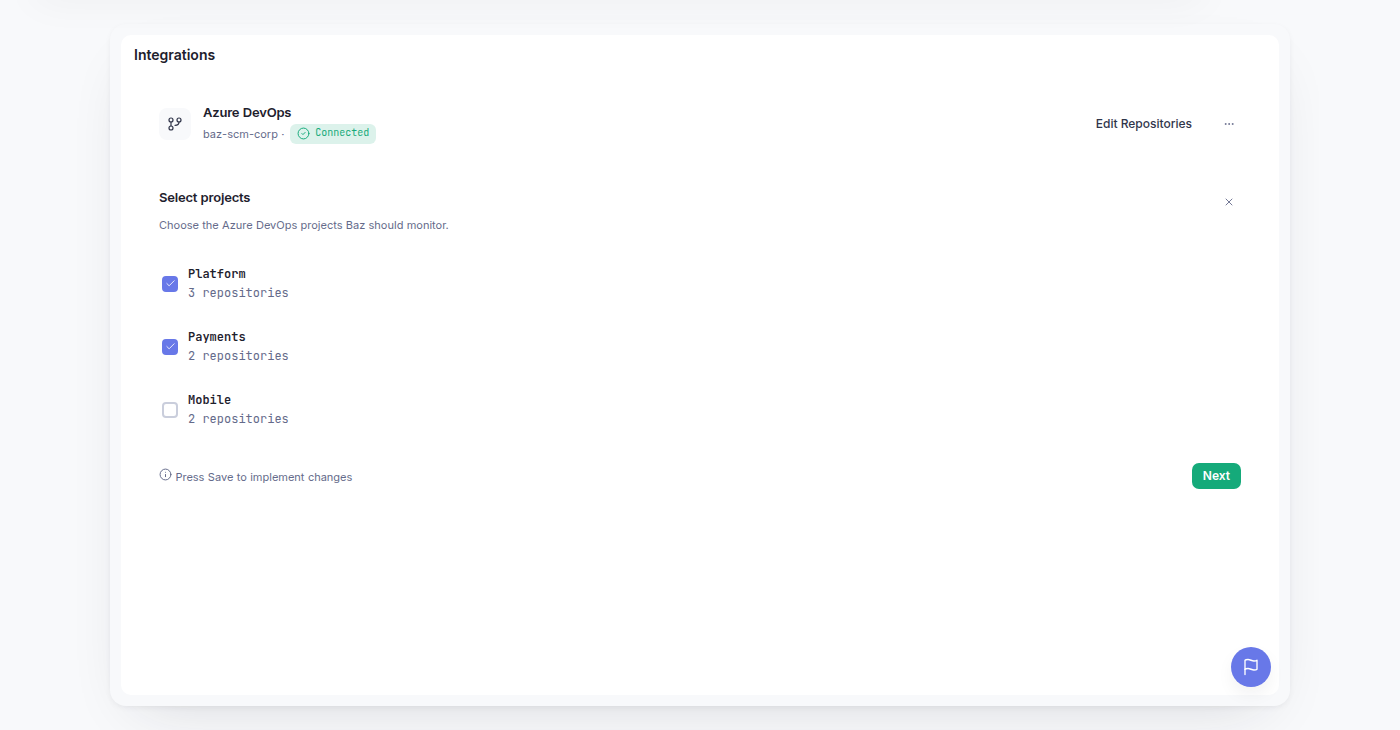
Once the connection to Azure DevOps is authorized, admins get a project and repository picker rather than a single repository list. Projects are shown as the top-level grouping, and admins can expand a project to select the specific repositories inside it. This mirrors how Azure DevOps organizations are actually organized internally, so admins are not stuck hunting through a flat list of names to figure out which repository belongs to which team.
The picker is not a one-time gate. Admins can return to it at any point from the Integrations Page to add a newly created repository, remove one that no longer needs review, or extend Baz into a second and third project once the first rollout has proven itself out.
Webhooks that stay in sync with the selection
Behind the picker, Baz manages the Azure DevOps webhooks that make review possible. When a project enters the selection, Baz registers the webhooks it needs to detect new pull requests, updates, and review activity in that project. When a project is removed from the selection, Baz removes the webhooks it previously created there.
This matters for two reasons. First, it means admins never have to go into Azure DevOps and manage webhook configuration by hand, which is exactly the kind of manual integration work that makes third-party tools painful to operate at scale. Second, it keeps Baz's footprint honest: if a project is not selected, Baz has no standing hook into it, and there is nothing left behind to clean up or audit later.
For platform teams and regulated enterprises, that tight coupling between what is selected and what Baz can actually see is the point. Access is not a broad grant that gets narrowed by convention. It is enforced at the integration layer, repository by repository.
What this means if you already connected Azure DevOps
If your organization connected Azure DevOps to Baz before this project-scoped selection was available, your existing connection may still reflect organization-wide access. To move to project-scoped access, an admin will need to reconnect the integration from the Integrations Page. Reconnecting walks through the same Microsoft OAuth flow, then presents the project and repository picker so you can choose the specific scope going forward.
This is a one-time step, and it does not require re-onboarding your whole workspace, just reauthorizing the Azure DevOps connection with the new picker.
Same reviewers, wherever your code lives
The reviewer agents behind this integration are the same ones Baz runs on GitHub: Code Correctness, Code Styling, and Security, with the same ability to layer in ticketing context and additional review agents as your workspace grows. Azure Repos support means the platform your organization already standardized on is no longer a reason to leave agentic code review on the table.
If your team is running on Azure DevOps and wants review coverage without opening up the whole organization, it is worth taking a look at what the scoped picker can do for your projects.