Code review needs an inbox
PR Inbox adds a My pull requests tab to Changes, with Waiting for review and My open PRs sections, so developers stop hunting repo lists to find what needs their attention.

Ask most developers how they figure out what to review today and the answer is some combination of a Slack ping, a stale notification, and scrolling a repository's pull request list looking for their own name. None of that is a workflow, it is a scavenger hunt that happens to work most of the time.
The Changes view already gives teams a shared list of every open pull request across their repositories, with search, filters, and pagination. What it did not give any individual developer was a personal starting point: the subset of that list that is actually theirs to act on. PR Inbox is that starting point.
A personalized tab, in two parts
The Changes page now has two top-level tabs: My pull requests and All pull requests. All pull requests is the shared list as it always worked. My pull requests is where the inbox lives, split into two sections on the same page: Waiting for review, the pull requests where a review has been requested from you, and My open PRs, the pull requests you authored. Each section paginates independently, so working through a long review queue does not reset your place in your own open PRs.
Both the tab and its sections reuse the exact same search, filters, and toolbar as the shared list, so switching into your inbox does not mean learning a second interface or losing a filter you had already applied.
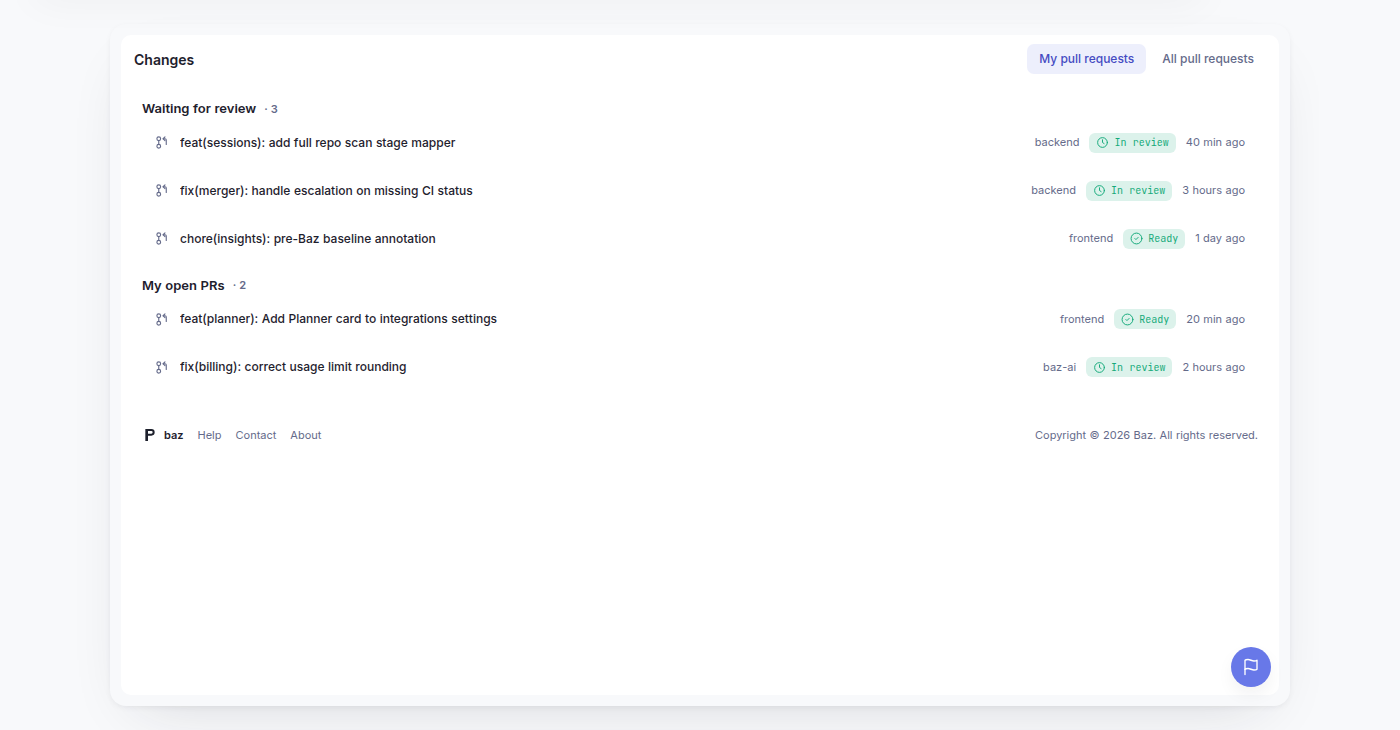
That consistency matters more than it sounds. A personalized view that behaves differently from the shared list is one more thing to learn and one more place a filter silently resets. PR Inbox is the same list, scoped to you, not a separate tool bolted on next to it.
A daily workflow, not just a filter
The value of PR Inbox is less about the filter itself and more about what it makes possible as a habit. A reasonable daily routine looks like this: start with Waiting for review, clear the pull requests where teammates are blocked on your feedback, then move to My pull requests to check on review progress, respond to comments, and address outstanding findings on your own changes.
Working it in that order keeps you focused on unblocking other people before circling back to your own open work, which is usually the higher-leverage thing to do first anyway. It also means the two sections answer two different questions cleanly: what does the team need from me, and what do I need to move forward.
Why this belongs in the review workflow, not a dashboard
Review tooling has a tendency to grow analytics dashboards for review activity while leaving the actual act of finding what to review unimproved. PR Inbox goes the other direction. It does not tell you how many pull requests are open across your organization, it tells you which ones are yours, right now, without a Slack thread standing between you and the fact that a teammate is waiting.
For developers, team leads, and reviewers who spend a meaningful part of their day inside pull requests, that is the fix that actually saves time: not a better report, a better starting page.