Skills & Instructions
Which agent rule files, Skills, and Cursor rules Baz reads, how it turns them into coding guidelines, and exactly how they are enforced on a pull request.
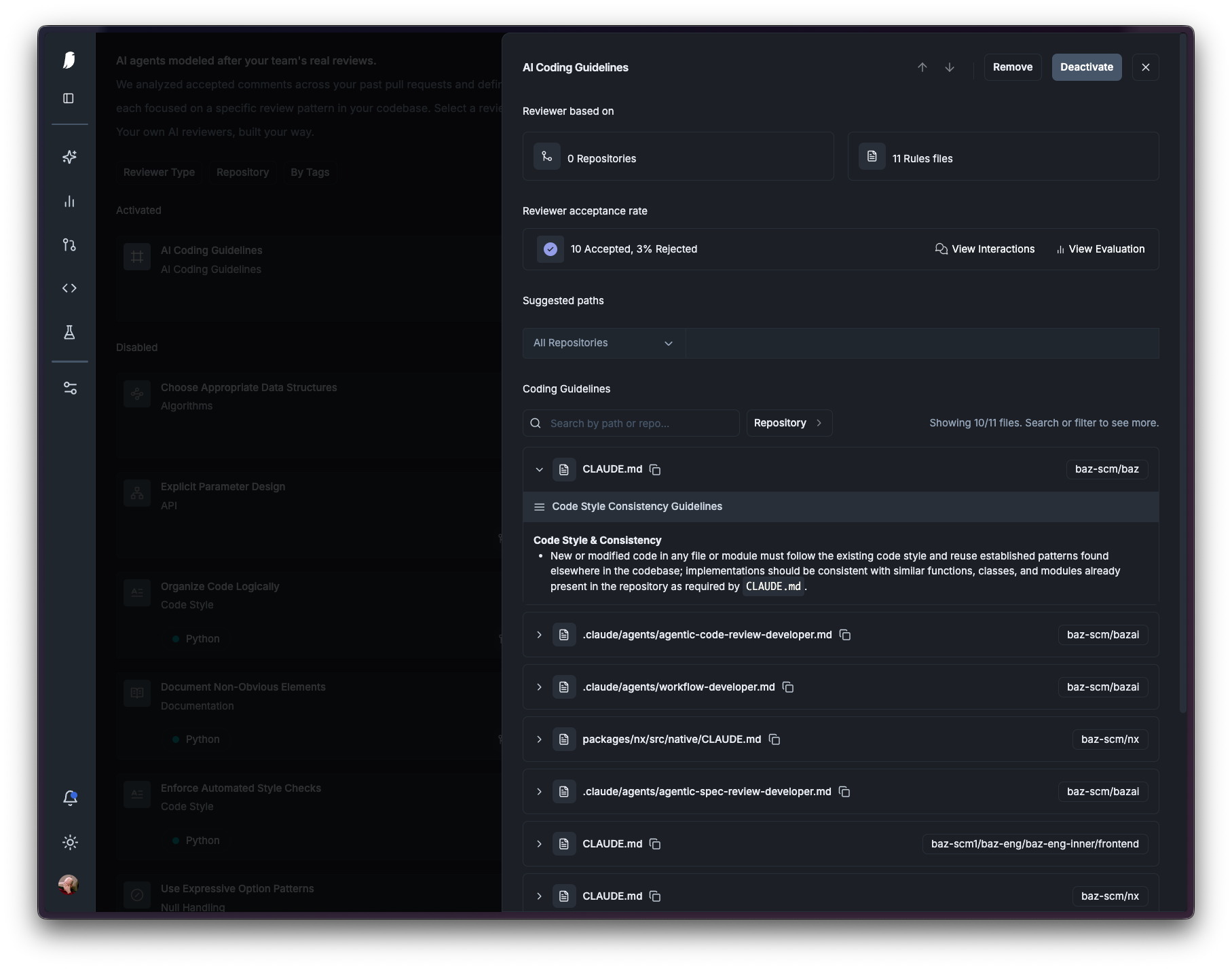
Baz reads the agent instruction files that already live in your repository (AGENTS.md, CLAUDE.md, Cursor rules, Agent Skills) and turns them into scoped coding guidelines. The AI Coding Guidelines reviewer then enforces those guidelines on pull requests.
This page documents exactly which files are picked up, where they have to live, what part of each file survives the conversion, and the order of the checks that decide whether a guideline is applied to a given pull request.
Supported files
Discovery is driven by an explicit list of path patterns. A file is a candidate only if it matches one of them. Nothing else in your repository is treated as an instruction file, whatever it is named.
Files matched at any depth
These are matched by file name, so they work at the repository root and inside any subdirectory, at any nesting level:
| File | Typical source |
|---|---|
AGENTS.md |
The AGENTS.md convention |
CLAUDE.md |
Claude Code |
.cursorrules |
Legacy Cursor rules |
.clauderc |
Claude Code config |
.coderabbit.yaml |
CodeRabbit config |
*BUGBOT.md, .*BUGBOT.md |
Cursor BugBot |
So CLAUDE.md, apps/api/CLAUDE.md, and apps/api/src/services/types/CLAUDE.md are all discovered.
Files matched at the repository root only
These patterns are anchored to the root of the repository. A copy of the same directory deeper in a monorepo is not discovered:
| Pattern | Typical source |
|---|---|
.cursor/rules/*.md, .cursor/rules/*.mdc |
Cursor project rules |
.cursor/BUGBOT.md |
Cursor BugBot |
.claude/*.md |
Claude Code |
.claude/agents/*.md, .claude/agents/*.mdc |
Claude Code subagents |
.agent/*.md, .agent/*.mdc |
Generic agent directory |
.agents/*.md, .agents/*.mdc |
Generic agent directory |
.cursor/rules/api.mdc is picked up. packages/api/.cursor/rules/api.mdc is not. If you need per-module rules in a monorepo, put an AGENTS.md or CLAUDE.md in that module instead: those are matched at any depth and are scoped to their directory automatically.
Skill folders
Skill folders are discovered as whole units, and also only at the repository root:
.claude/skills/*.cursor/skills/*.agent/skills/*.agents/skills/*
A folder is only usable as a Skill if it contains a SKILL.md (or an AGENTS.md) at its top level. Folders without one are skipped.
What is always ignored
.claude/commands/and.cursor/commands/. Slash commands are agent invocations, not reviewable standards.- Any file under a skill folder is handled as part of that Skill, never as a standalone instruction file.
- Anything that does not match a pattern above.
Skills
Skills are reusable packages of instructions following the open Agent Skills standard. Baz treats a skill folder as one guideline rather than as a pile of separate files.
Because skill folders can be large, each file inside is first reduced to its reviewable content on its own, then the reduced versions are concatenated into a single unified guideline in a fixed order:
SKILL.md(orAGENTS.md), under a# SKILL: <name>headerreferences/scripts/assets/- Everything else
Every section keeps a # Path: <original/path> header, and the conversion is instructed to attribute each extracted rule to the file it came from. That is why a finding from a Skill cites the nested source file (for example .claude/skills/api-new/references/validation.md) and not just the folder.
Skills and rules from plugins in another repository
Baz also resolves instruction files that your repository consumes rather than owns. If a repository contains a .claude/settings.json that declares a git marketplace in extraKnownMarketplaces and enables a plugin from it in enabledPlugins, Baz:
- Reads the marketplace manifest (
.claude-plugin/marketplace.jsonormarketplace.json) from the source repository. - Resolves the plugin’s root directory from the manifest.
- Scans that root with the same file patterns and the same
SKILL.mdfolder detection described above.
Notes and current limits:
- Only git-source marketplaces are resolved. Other source types are skipped.
- A plugin whose manifest entry points at a different repository than the marketplace URL is not resolved.
- The source repository must be connected to Baz, since the files are read through Baz’s own git access.
- Resolved plugin guidelines are stored once per organization and shared by every repository that enables the plugin, so the conversion cost is paid once and an update to the source repository propagates to all consumers on its next scan.
- A plugin’s
commands/directory is excluded, the same as local slash commands.
See Plugins for the Baz plugin itself.
From file to guideline
Discovery and conversion run outside of code review, so a pull request never waits on them.
- Scan. A full scan runs when a repository is first connected. After that, every push to the default branch triggers an incremental scan of the files that push touched. Deleted instruction files, and skill folders whose files were all deleted, are removed from the store.
- Extract. Each file (or each composed Skill) is converted into a guideline object with a title, a short description of when it applies, and reviewer-facing content.
- Guardrail. Converted content is checked by a content guardrail before it is stored. Content that fails is dropped.
- Store. Surviving guidelines are persisted and surfaced in the Baz UI, one row per instruction file or skill folder.
What survives the conversion
The extraction step deliberately keeps only rules that a reviewer can verify by reading code, and rewrites them from implementation voice into review voice. “Always use getAuthorizedUser at the start of API handlers” becomes “All API handlers must call getAuthorizedUser with appropriate role checks.”
Kept:
- Code patterns, architectural and file-organization requirements
- Security rules, error handling, naming and import conventions
- Testing and documentation requirements that are visible in the code
- Performance requirements, and references to other rule files
Dropped:
- Instructions about how the agent should behave or communicate
- Process and workflow steps (what to do before or after coding)
- Anything that requires running something (tests, linters, type checkers, formatters)
- Metadata and configuration directives
This is the most common reason a rule you wrote does not produce findings. A rule like “run the type checker before committing” is real and useful for your coding agent, but it is not checkable by reading a diff, so it is not carried into the reviewer. If a file contains no reviewable rules at all, no guideline is created from it.
How guidelines are enforced on a pull request
There is no priority ordering between guidelines. Every guideline whose scope covers the change applies, as a union. A root-level file does not outrank a module-level file, and a module-level file does not override a root-level one. What varies between guidelines is scope, not rank.
For a given pull request, the checks run in this order:
- Is the reviewer enabled? The AI Coding Guidelines reviewer must be enabled on the repository. See Working with agents.
- Is the file enabled for review? Instruction files individually turned off for this reviewer are excluded. See below.
- Does the file’s scope cover the change? A guideline applies only to changed files inside its scope directory:
- A file at the repository root (
CLAUDE.md,.cursor/rules/api.mdc,.claude/skills/api-new/) is scoped to the whole repository. - A file inside a module (
packages/api/CLAUDE.md) is scoped topackages/api/and everything under it. - For a file inside an agent directory, the scope is the directory containing that agent directory, not the agent directory itself.
src/backend/.cursor/rules/db.mdcis scoped tosrc/backend/. - A guideline scoped to
src/backend/is not applied to a pull request that only touchessrc/frontend/.
- A file at the repository root (
- Is anything left? If no guideline survives scoping, the AI Coding Guidelines reviewer is dropped from the run entirely. It never posts “no guidelines matched” noise, and it does not fall back to guessing at conventions.
- Selection at review time. The reviewer is given the list of surviving guidelines with their titles, paths, and descriptions, and must call the
read_agent_filetool to read the ones relevant to the change before it produces any finding. It is instructed to use only guidelines read through that tool and never to infer a convention that is not in one. Scoping decides what can apply; this step decides what the reviewer actually reads for this specific diff. - Findings cite their source. Every finding names the guideline file it came from, which for Skills is the nested source file inside the skill folder.
Database migration files are excluded from this reviewer’s diff. Test files and configuration files are not.
Turning an individual file off
Each discovered instruction file can be disabled for the AI Coding Guidelines reviewer from the Baz UI. Disabling a file removes it from code review only. Other consumers, including Fixer and the PR walkthrough, keep using it. Files are enabled by default, and guidelines shared from a plugin in another repository are always enabled for their subscribers.
Coding Guidelines Update
When the reviewer’s feedback reveals that a rule in your instruction files no longer matches how the team actually works, Baz can update the file itself, turning a single review comment into a durable standard.
Reply to the finding with one of:
| Comment | Result |
|---|---|
apply commit |
Commit the change directly to the pull request branch |
apply pr |
Open a pull request with the change |
apply pr to <branch> |
Open a pull request against <branch>, for example apply pr to main |
The command is matched anywhere in your comment and is case insensitive, so “good catch, apply pr to main” works. An agent then analyzes the interaction and drafts the change to your instruction files.
This requires Fixer. See Fixer.
Configuration summary
- Discovery is automatic. There is nothing to configure to have your instruction files picked up.
- The AI Coding Guidelines reviewer runs on repositories where it is enabled and where at least one guideline is in scope for the pull request.
- Guideline content is controlled entirely by the files in your repository. Editing those files is how you change the reviewer.
- Individual files can be excluded from code review with the per-file toggle in the Baz UI.
FAQ
Can I edit the AI Coding Guidelines review prompts?
No. This reviewer’s prompt comes from the instruction files found in your codebase. Update the files in your repository and Baz syncs the change on the next push to your default branch. If you want a reviewer with a prompt you write and own, use a custom reviewer.
How do I enable this reviewer?
Enable “AI Coding Guidelines” for the repository from the Baz Agents section.
I added a rule but the reviewer never flags it. Why?
Work through the pipeline in order:
- Is the file discovered? Check it against the pattern lists above. The most common miss is a
.cursor/rules/or.claude/skills/directory inside a subdirectory of a monorepo instead of at the repository root. - Was the rule kept? Rules that require running a tool, or that describe agent behavior or process rather than code, are dropped during conversion. Open the guideline in the Baz UI to see what was actually extracted from your file.
- Is the rule in scope? A guideline only applies to changed files under its scope directory.
- Is the file enabled? Check the per-file toggle.
Which file wins when a root file and a module file disagree?
Neither. Both apply. Baz has no precedence model between instruction files, so a contradiction between two in-scope guidelines can surface as contradictory feedback. Resolve it in the files themselves rather than relying on ordering.
When are my changes to an instruction file picked up?
On the next push to your default branch that touches that file. Changes on a feature branch are not used to review that same branch.