Sessions
Sessions provide visibility into every Baz agent execution, from reviewer runs to Fixer, Merger, Planner, security scans, and SRE.
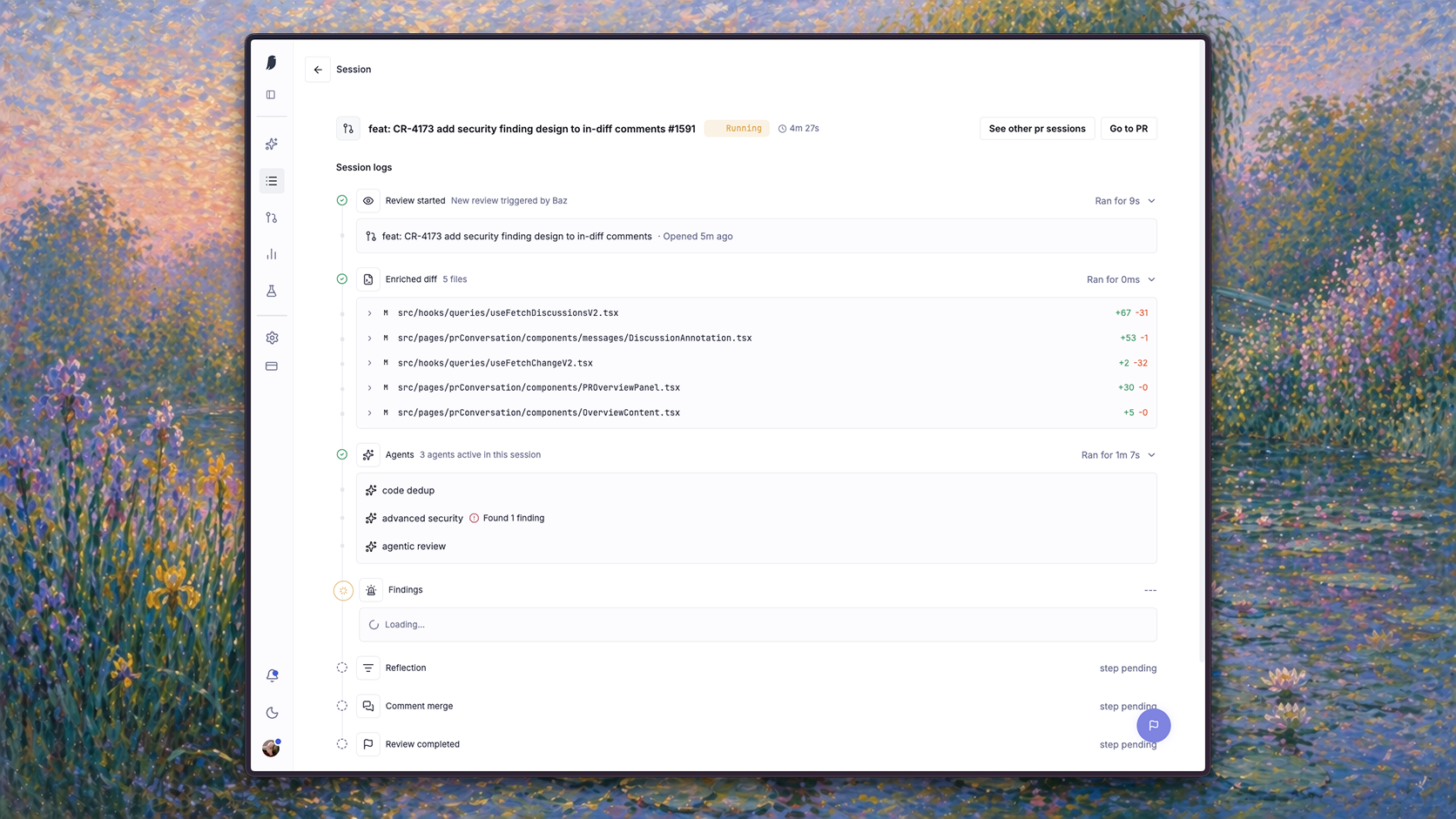
While Pull Requests focus on review results, Sessions focus on how those results were produced. They show the reviewers that ran, the code they analyzed, the findings they generated, and the execution path that led to the final review.
Session Timeline
Each stage represents a step in the review pipeline.
| Stage | Function |
|---|---|
| Review Started | Review request received |
| Enriched Diff | Files and context collected |
| Agents | Reviewers analyze the change |
| Findings | Issues generated |
| Reflection | Findings validated and refined |
| Comment Merge | Overlapping findings consolidated |
| Review Completed | Results published |
Enriched Diff
The Enriched Diff stage shows the exact files reviewed by Baz.
It includes the modified files, change size, and review scope used during analysis.
Findings
The Findings stage displays issues generated during review.
From here you can see:
- Which findings were created
- Their severity
- Whether they were published
- How they contributed to the final review outcome
Reflection
Before publishing findings, Baz performs a reflection pass.
This stage reevaluates generated findings to improve quality and reduce unnecessary noise before comments are posted.
Comment Merge
Multiple reviewers may identify the same issue.
The Comment Merge stage consolidates overlapping findings into a single comment, reducing duplication while preserving review context.
Session types
Sessions are not limited to the PR reviewer flow. Every agent run Baz executes is captured as a session, whether it runs against a pull request or against an entire repository.
Each session type shares the same outer record and differs in the stages its timeline contains.
Every session, whatever its type, records:
- Origin: what triggered the run, and who or what requested it
- Status: queued, running, completed, skipped, or failed
- Environment: where the run executed, including the sandbox for agents that need one
- Timeline: the ordered product events for the run, including tool calls
- Outcome: what the run produced, or the stage it stopped at and why
- Cost: the credits the run consumed
| Session type | Scope | Trigger | Outcome recorded |
|---|---|---|---|
| Reviewer | Pull request | New PR or commit on a configured repo | Published findings and CI check result |
| Fixer | Pull request | Apply fix, Fix all, auto-fix, or an agent handoff | A pushed commit, or validation diagnostics |
| Merger | Pull request | New PR or commit matching a Merger rule | Merge, reject, or escalate, plus the label and any merge |
| Planner | Repositories in scope | /baz:plan-with-baz from a coding agent |
A plan version in the Plans workspace |
| Security | Repository | A full codebase scan started from Advanced Security | Persisted findings by severity |
| SRE | Service and repository | A production signal from a connected observability tool | A fix PR, or a finding with a fixing prompt |
Reviewer sessions
The reviewer session is the default format, and the one the timeline above describes: review started, enriched diff, agents, findings, reflection, comment merge, review completed.
Reviewer sessions cover every review agent that runs on a pull request, so a Spec Reviewer run appears as a reviewer session too, with the ticket and design context it gathered and a verdict per requirement in place of diff-scoped findings.
Fixer sessions
Fixer runs inside an ephemeral sandbox, so its session doubles as the record of what the sandbox did. Fixer sessions for a pull request are also reachable from the Fixer agent drawer, through See logs on the relevant sandbox environment.
| Stage | What the session shows |
|---|---|
| Fix requested | Which finding or findings the run targets, and whether it came from a single comment, Fix all, auto-fix, or another agent |
| Sandbox setup | The repository snapshot, applied environment variables, setup script, and dependency install |
| Fix | The agent’s tool calls and responses while composing a minimal patch |
| Validation | The format, lint, and build checks declared by the repository, and their results |
| Commit | The pushed commit, or the structured diagnostics recorded instead when validation failed |
A Fixer session that fails validation is still a complete record: it ends with diagnostics rather than a commit, so it is clear that nothing was pushed and why.
Merger sessions
Merger sessions explain a verdict, not just report it.
| Stage | What the session shows |
|---|---|
| Evaluation opened | The commit or pull request that triggered the run, and the Merger rule matched |
| Rule gates | The deterministic bars in the rule, such as file-count or severity limits, and whether the PR cleared them |
| Signals | CI state, unresolved findings, PR metadata, diff context, repo impact, git history, auto-approve rules, and org guidelines |
| Reasoning | The tool calls Merger made to size up the blast radius of the change |
| Verdict | Merge, reject, or escalate, with the rationale |
| Action | The label applied, any comment posted, and whether Merger merged the PR itself |
Planner sessions
Planner sessions trace how a plan was produced, before any code exists.
| Stage | What the session shows |
|---|---|
| Invocation | The /baz:plan-with-baz request, the task text, and the repositories in scope |
| Context gathering | Every tool call the agent made while investigating the codebase |
| Plan | The plan it produced: affected repos and files, change sequence, cross-repo coordination, open questions, and verification steps |
| Events and stats | Run events and per-run statistics, including which plan version this run created |
Because each revision of a plan is its own version, the session is the link between a version in the Plans workspace and the run that generated it.
Security sessions
A full codebase scan is the one session type that needs no pull request. It walks the repository itself.
| Stage | What the session shows |
|---|---|
| Scan requested | The target repository, who started the scan, and the scope it was given |
| Setup | The repository context, module metadata, dependency information, and cyber.md instructions loaded for the run |
| Scanning | The agent’s tool calls as it walks the codebase rather than a diff |
| Findings | Findings persisted with file and line range, severity, confidence, and remediation |
| Completion | Whether the scan finished, is still running, or failed, and at which stage |
Baz blocks a second active scan on the same repository, so a scan session is also how you check whether one is already running before starting another. Findings can be handed to Fixer, which opens its own Fixer session linked from the finding.
SRE sessions
The SRE Agent starts from production behavior rather than a code change, so its session begins with telemetry.
| Stage | What the session shows |
|---|---|
| Signal ingested | The traces, spans, or logs from the connected observability tool that opened the run |
| Code mapping | How git metadata on the spans resolved to a repository, file, and function |
| Risk analysis | The reliability, performance, or observability risk the agent identified, with the evidence behind it |
| Fixing prompt | The remediation objective the agent produced from that analysis |
| Handoff and delivery | The Fixer session it triggered, the pull request opened, and any Slack post, subject to the org’s toggles |
Because delivery runs through Fixer, an SRE session and the Fixer session it starts read as one chain: signal, code, fix, PR.
Monitoring Active Reviews
Sessions can be used as a live execution dashboard.
While a review is running, the timeline provides visibility into:
- Current execution stage
- Review progress
- Generated findings
- Long-running or blocked steps
This makes it easy to understand what Baz is doing without waiting for the review to finish.
FAQ
What is the difference between Pull Requests and Sessions?
Pull Requests shows review results. Sessions shows how those results were produced: which agents ran, what they analyzed, and the execution path that led to the findings.
Can I watch a review while it runs?
Yes. The timeline works as a live dashboard, showing the current stage, progress, findings so far, and any long-running or blocked step, without waiting for the run to finish.
Which runs appear as sessions?
Reviewer, Fixer, Merger, Planner, security, and SRE runs. A full repository security scan is the one session type that needs no pull request, because it walks the repository itself.