Enterprise Hosting
Deployment options and enterprise controls: Baz Cloud, Private Mode, and self-hosted, plus SSO, admin controls, and procurement.
Baz runs in three deployment shapes, and enterprise organizations pick the one that matches their data residency requirements. Everything else about the product, including the agents, integrations, and dashboards, is the same in all three.
Deployment options
| Baz Cloud | Private Mode | Self-hosted | |
|---|---|---|---|
| Where it runs | Baz-managed AWS environment | One File System Service (FSS) pod in your VPC, with analysis on Baz infrastructure | Control plane and agent runtime in your own cloud |
| Where your code lives | Accessed transiently for analysis, never persisted at rest | Stays in your infrastructure, exposed to Baz through scoped, temporary read access | Never leaves your cloud |
| Setup | Managed by Baz, start in minutes | A Helm chart on your AWS EKS cluster, set up with Baz support | Deployed with the Baz team |
| Connectivity | Managed by Baz | Hardened REST: IP allowlist, TLS, and API key auth | Runs inside your network |
| Audit logging | Standard platform logs | Every FSS operation logged inside your environment | Logged inside your environment |
| Best for | The fastest way to get started | Strict data residency requirements | Maximum isolation and control |
Private Mode is available on Pro and Enterprise. Deploying in your own VPC, which covers the self-hosted shape, is an Enterprise capability. To scope a self-hosted deployment, talk to sales.
Enterprise controls
Beyond where Baz runs, the Enterprise plan adds the governance controls larger organizations need: SAML/OIDC single sign-on, centralized admin controls, repository owners, and custom terms. Compare them against Pro on the pricing page.
Two controls apply on every plan and are worth knowing about when reviewing a deployment. Agents inherit your repository permissions, branch protection, and policy rules, so they cannot act outside the scope you grant. And the write-side automation, meaning auto-fix, auto-approve, and auto-merge, is gated by the rules you configure in Configurations and Merge Automation, so Baz acts only where you allow it.
Baz is SOC 2 certified and runs in isolated AWS environments. Current certifications, subprocessors, and control details live in the Trust Center, and Security, Privacy and Compliance covers how data is handled. Usage controls, including organization and per-user limits, are documented under Billing.
Baz is also listed on the AWS Marketplace, for teams that would rather procure through an existing AWS agreement.
What Private Mode is
Private Mode lets organizations with strict data residency requirements run Baz while keeping control of source code storage. Instead of persisting repositories on Baz infrastructure, you deploy a single FSS pod in your environment that gives Baz temporary access to perform code analysis. Code is queried and processed on Baz infrastructure during analysis, handled transiently, and wiped as soon as the review completes or errors out. No source code is persisted on Baz servers.
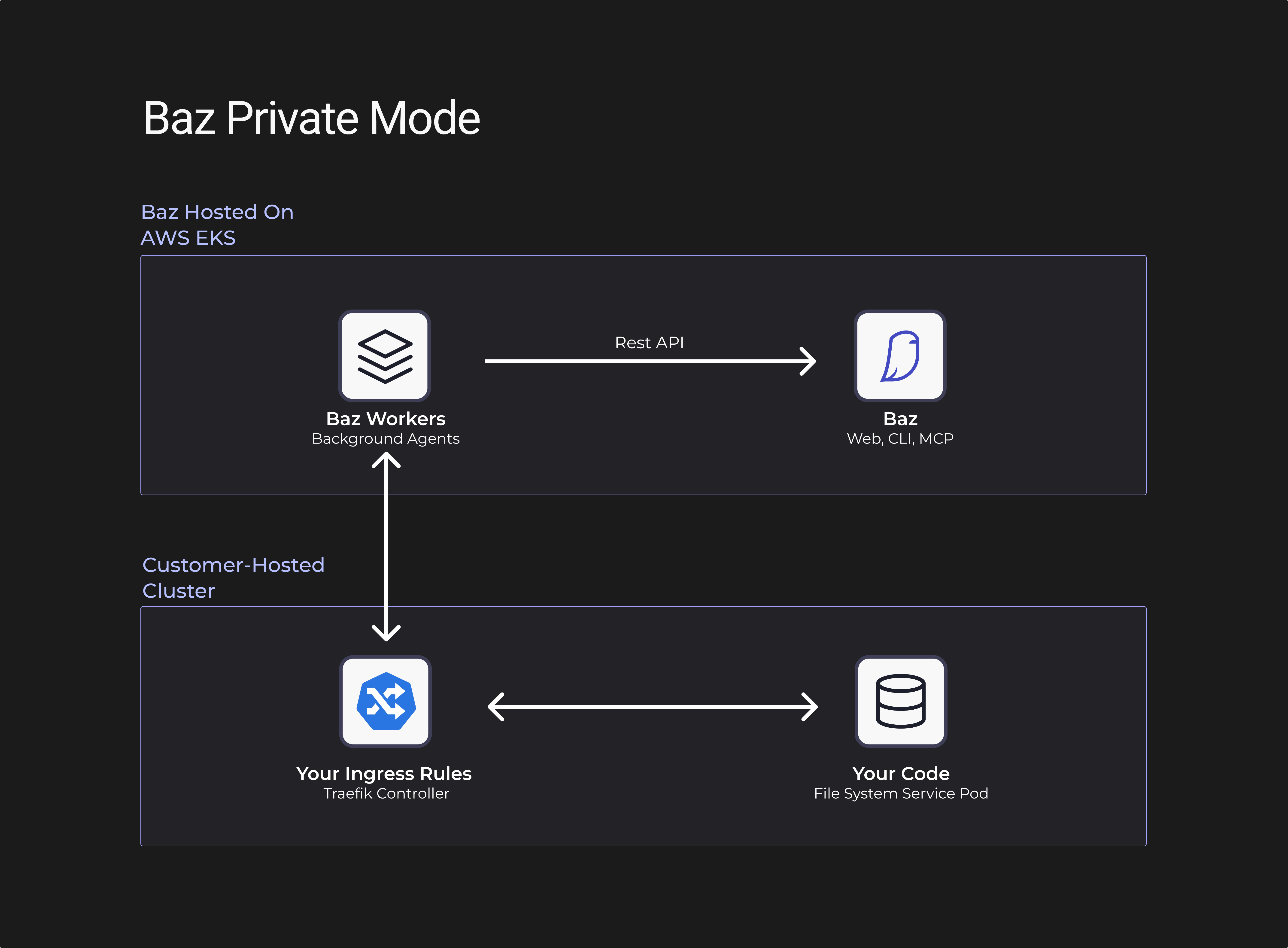
In the standard deployment, the FSS runs on Baz infrastructure. With Private Mode, you run the same service in your own environment, so the path becomes repository to FSS in your infrastructure to analysis, rather than repository to FSS on Baz infrastructure to analysis. The FSS acts as a filesystem operator for Baz, providing temporary access to diffs, files, and directories across commits, only when a review needs it.
The architecture has three parts. An ingress controller routes traffic from a subdomain you configure, for example https://baz.acme.com or https://acme.com/baz, to the FSS pod. The FSS pod provides the temporary filesystem access. Baz infrastructure connects to it over REST, secured by an IP allowlist, SSL/TLS, and API key authentication.
Network requirements
The FSS pod needs outbound connectivity to Baz infrastructure, and your ingress must accept inbound HTTPS from the following three public IP addresses:
18.190.165.140
3.20.124.148
3.12.220.91
Prerequisites
Private Mode setup is done together with Baz support. Before you start, make sure you have the following in place.
| Prerequisite | Notes |
|---|---|
| Kubernetes cluster | AWS EKS |
| Helm | 3.x |
| Ingress controller | For example Traefik or NGINX |
| Subdomain or URL prefix | For FSS access |
| AWS account ID | For ECR image access |
| Network policy | Inbound HTTPS allowed from the Baz IP addresses above |
| GitHub Personal Access Token | Classic or fine grained, with contents: read on the repositories you intend to integrate. See the GitHub docs |
Step 1: Contact Baz support
Sign up to Baz, then reach out to support@baz.ai, or your shared Slack channel if one exists, to start Private Mode setup. Baz support provides the API token for FSS pod authentication, the Helm chart for the deployment, and ECR repository access for your AWS account.
Step 2: Deploy the FSS with Helm
Install the FSS pod in your Kubernetes cluster using the Helm chart. Create a values.yml file with at least the following keys:
image:
  repository:  497250501322.dkr.ecr.us-east-2.amazonaws.com/baz-fss-private-mode
  tag:  0.1.0  # Replace with latest - as given from baz support

service:
  type: ClusterIP
  port: 3000

env: private

githubPat: # required (or set via secret). Needs to have the permissions to the repos you intend to integrate
privateModeKey: # required (or set via secret). Supplied by baz support
Further options, including secret handling, are documented in values.yml. Once set, deploy the helm chart:
helm repo add baz https://baz-scm.github.io/helm-charts
helm repo update

helm install baz-fss baz/private-mode \
  --namespace baz-system \
  --create-namespace \
  --set apiToken=YOUR_API_TOKEN
Step 3: Configure the ingress route
Set up an ingress route that exposes the FSS at either a subdomain, https://baz.acme.com, or a URL prefix, https://acme.com/baz. The ingress must allow inbound traffic from the three Baz IP addresses above.
Example Traefik IngressRoute:
apiVersion: traefik.containo.us/v1alpha1
kind: IngressRoute
metadata:
  name: baz-fss
  namespace: baz-system
spec:
  entryPoints:
    - websecure
  routes:
    - match: Host(`baz.acme.com`)
      kind: Rule
      services:
        - name: baz-fss
          port: 8080
  tls:
    certResolver: letsencrypt
Step 4: Create your Baz account and organization
Sign up at https://baz.co/login, create your user account, and set up your organization.
Step 5: Share integration details
Give the FSS endpoint URL, for example https://baz.acme.com, to Baz support so they can validate traffic from their end. Support then configures the FSS integration for your organization, tests connectivity and authentication, verifies the setup, and confirms when it is complete.
Step 6: Connect your repositories
Once support confirms the integration is ready, return to https://baz.co/login and follow the standard Baz integration flow for GitHub or GitLab. All repository storage and filesystem operations then use your FSS pod automatically, which you can confirm by following the container logs on your end. From there, use Baz as normal with full Private Mode data residency.
Security considerations
Source code is stored exclusively in your infrastructure; Baz accesses it transiently for analysis and wipes it after processing. Communication with Baz infrastructure runs over REST with three layers of protection: an IP allowlist so only Baz’s public IPs can connect, SSL/TLS encryption, and API key authentication. The FSS sits behind your ingress controller under your own network policies, and every FSS operation is logged inside your environment for compliance and security monitoring.
Support
All Private Mode setups involve Baz support. For setup, questions, or issues, email support@baz.ai or use your shared Slack channel if one exists.
FAQ
Which deployment option should we choose?
Baz Cloud is the fastest to start and persists no source code at rest. Private Mode is for teams that need repositories to stay in their own infrastructure. Self-hosted is for teams that need the control plane and agent runtime in their own cloud too. Feature coverage is the same in all three.
Does Private Mode support all Baz features?
Yes. Note that the FSS pod needs upgrading periodically to pick up new features and improvements.
Why is a GitHub PAT needed, and do we need one per user?
The PAT is used by the pod deployed on your side, so it can clone repositories without your system receiving secrets from ours. One valid PAT serves the whole organization, and it does not matter who creates it.
Which permissions should the GitHub PAT have?
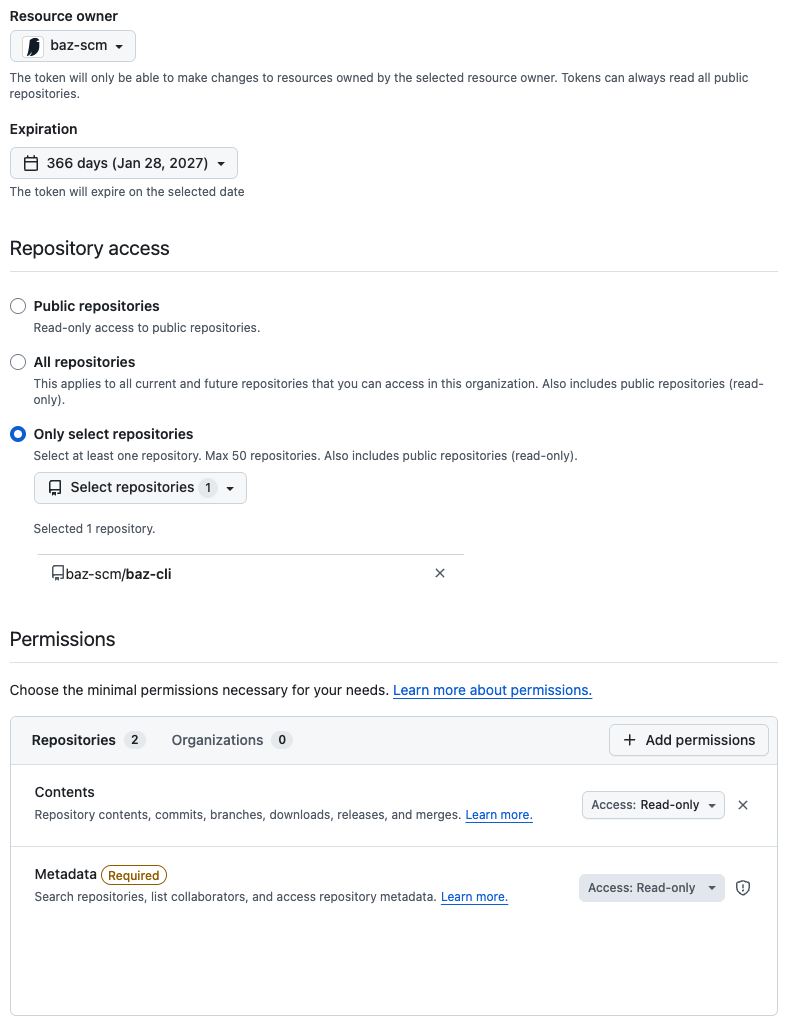
contents: read on the repositories you integrate with Baz. Grant the token access to those repositories first, and only then integrate them with the Baz Reviewer app in GitHub. Example permissions:
What happens if the FSS pod goes down?
Reviews pause until the FSS is restored. No data is lost, and reviews resume automatically once connectivity is re-established.
Can the FSS run outside AWS EKS?
No. FSS deployment is currently supported on AWS EKS only, which keeps it compatible with the ECR-hosted images and the rest of the infrastructure requirements.
Can we buy Baz through AWS?
Yes. Baz is listed on the AWS Marketplace, which lets you procure it under an existing AWS agreement.